

May Affect Views
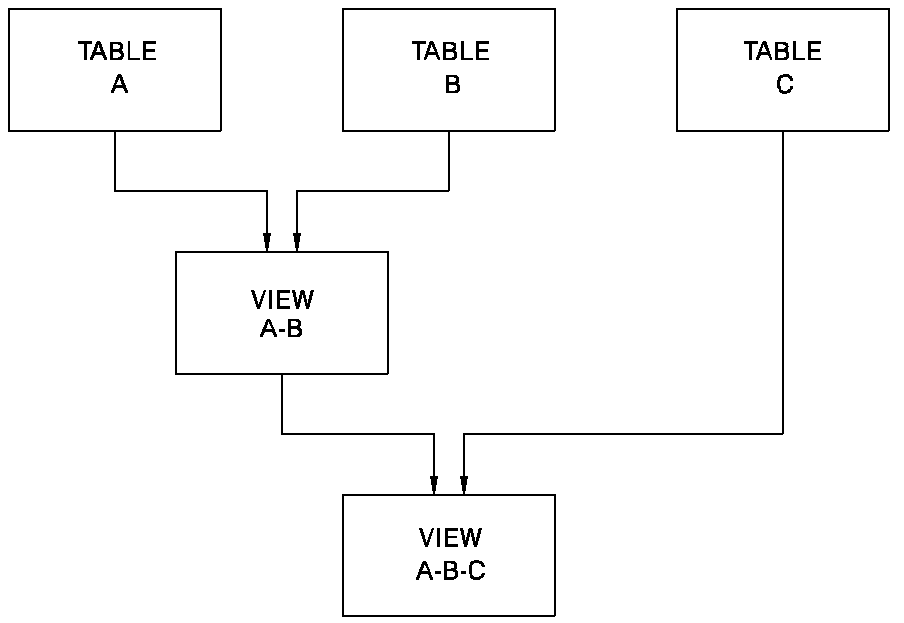
A source table is a table from which another table is derived. Any table, whether a stored table or a view (except views derived from non-SQL defined records), can be used as a source from which to derive another table. Since views can use other views as source tables, the original source table may be logically removed from a view, as illustrated below.
Regenerate Affected Views
Modifying or deleting a table, therefore, can have far-reaching effects. Every view that uses the modified or deleted table as a source, either directly or through another view, is given a MUST REGENERATE status. When you try to access a view with a MUST REGENERATE status through the Display/Change Data, Select Data, or Query functions, you are notified that the view must be regenerated before it can be used.
Views Change Automatically
The definition of the view reflects the changes made to the source table, as follows:
When derivation information is deleted and re-added, it may be necessary to go to the column definition screen (CDEF) and renumber the display sequence numbers before regenerating the view. When the derivation is updated, ASF uses a value from the view's definition record to determine the beginning sequence number for columns. It will now be one greater than the number of columns in the original view. As a result, some or all of the data may not be displayed.
Definition selection criteria and work columns must be redefined after the derivation is re-added.
Since the source table modifications are reflected automatically in the definition of the view, you do not have to make the same changes to both tables. You can select the Generate function on the Table Definition screen and regenerate the view and its supporting structures.
Regenerate in Proper Order
Views derived from views must be regenerated in the order that they were defined. For example, in the figure above, if Table A is modified, both View A-B and View A-B-C would be placed in MUST REGENERATE status. View A-B must be regenerated before View A-B-C.
View Meaning May Change
Changes to a source table can affect the meaning of a view. If the source table is modified, the portion of the view definition derived from that source table is modified automatically except when one or more columns are added to the source table. In this case, select the view flagged for regeneration, erase the source table name from the Table Definition screen or Extended Table Derivation screen, and then reenter the same name to update the derivation.
May Have to Renumber Columns
Before regenerating the view, it may be necessary to renumber the display sequence numbers on the Column Definition screen. When the derivation is updated, ASF uses a value from the view's definition record to determine the beginning sequence number for columns. It will now be one greater than the number of columns in the original view. As a result, some or all of the data may not be displayed.
May Delete View
In some cases, you may choose to delete a view as a result of changes to a source table. For example, in the figure above, if Table A is deleted, View A-B-C could be modified so that it is derived directly from Table B, becoming View B-C; View A-B could be deleted since it would probably be the same as Table B.
Be Careful
Since one table can be used as a source table in many views, the effects of modifying or deleting a table should be considered before any action is taken.
|
Copyright © 2014 CA.
All rights reserved.
|
|