

Identifying Source Records in Different Orders to Change Results
The following diagram illustrates the records being used to derive a view:
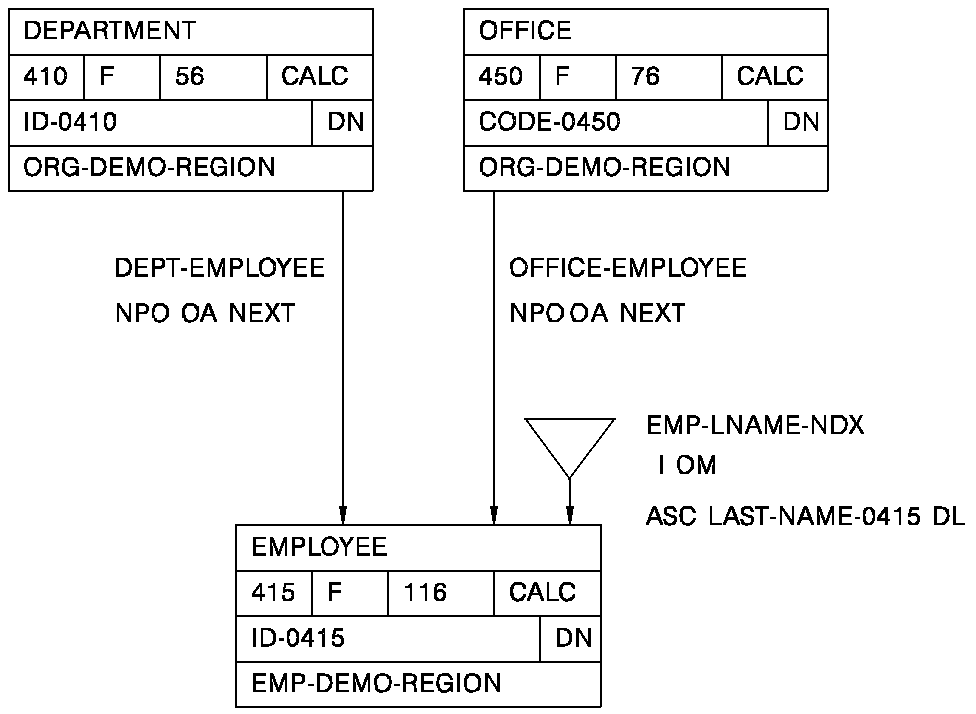
The records are identified in the following order:
             Source Record             Derivation Source #

             DEPARTMENT                     01
             EMPLOYEE                       02
             OFFICE                         03
The records are joined on the following set relationships:
     Column #1/Set     Of Der   Oper         Column #2      Of Der

     DEPT-EMPLOYEE       01      ST                           02
     OFFICE-EMPLOYEE     03      ST                           02
The records are obtained as follows:
OBTAIN EACH DEPARTMENT WITHIN area-name
OBTAIN EACH EMPLOYEE WITHIN DEPT-EMPLOYEE
OBTAIN OWNER WITHIN OFFICE-EMPLOYEE
In this example, any employee not connected to a department will not be returned.
The records are identified in the following order:
             Source Record             Derivation Source #

             EMPLOYEE                       01
             OFFICE                         02
             DEPARTMENT                     03
The records are joined on the following set relationships:
     Column #1/Set     Of Der   Oper         Column #2      Of Der

     OFFICE-EMPLOYEE     02      ST                           01
     DEPT-EMPLOYEE       03      ST                           01
The records are obtained as follows:
OBTAIN EACH EMPLOYEE WITHIN area-name
OBTAIN OWNER WITHIN OFFICE-EMPLOYEE
OBTAIN OWNER WITHIN DEPT-EMPLOYEE
In this example, all employees are returned, though not every employee may be connected to a department or an office.
Defining an Ambiguous Path
The previous diagram illustrates the records being used for derivation.
The records are identified in the following order:
             Source Record             Derivation Source #

             DEPARTMENT                     01
             OFFICE                         02
             EMPLOYEE                       03
The records are joined on the following set relationships:
     Column #1/Set     Of Der   Oper         Column #2      Of Der

     DEPT-EMPLOYEE       01      ST                           03
     OFFICE-EMPLOYEE     02      ST                           03
ASF would attempt to build a retrieval path as follows:
OBTAIN EACH DEPARTMENT WITHIN area-name
OBTAIN EACH OFFICE WITHIN area-name
OBTAIN EACH EMPLOYEE WITHIN DEPT-EMPLOYEE
The OFFICE-EMPLOYEE set join would cause an error because ASF is unable to connect the OFFICE record, which was already obtained, to the EMPLOYEE record obtained through the DEPT-EMPLOYEE set. Since the DEPARTMENT and OFFICE records are not connected through any set relationship, a logical path cannot be built.
Joining Records that Are Already Directly Connected
The following diagram illustrates the records being used for derivation:
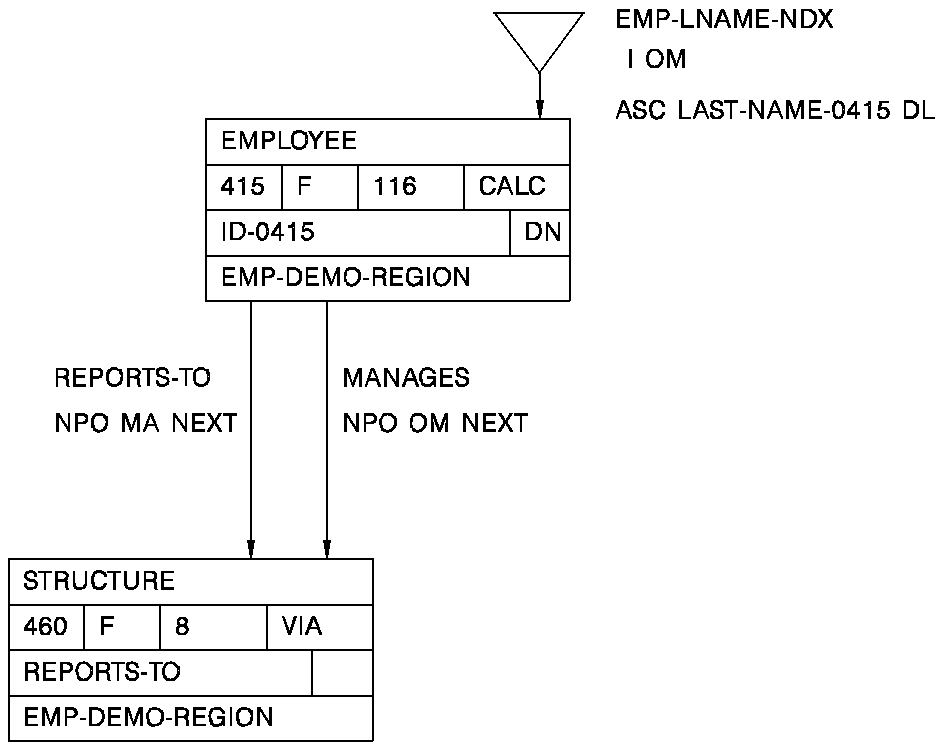
The records are identified as follows:
             Source Record             Derivation Source #

             EMPLOYEE                           01
             STRUCTURE                          02
The join information is entered as follows:
    Column #1/Set     Of Der   Oper         Column #2      Of Der

    REPORTS-TO           01      ST                           02
    MANAGES              01      ST                           02
The MANAGES set join would not be allowed because the EMPLOYEE and STRUCTURE records are already directly connected through the first join defined.
Note: To include the MANAGES set in the table, identify the EMPLOYEE record again as a separate derivation source (derivation source #3) and specify the following join information:
Column #1/Set    Of Der   Oper       Column #2     Of Der

REPORTS-TO          01      ST                        02
MANAGES             03      ST                        02
Note that the resulting view returns two records of the same record type. Only the last record obtained will be updated in the database when updates are made through the view.
Joining Records that Are Already Indirectly Connected
The following diagram illustrates the records being used for derivation:
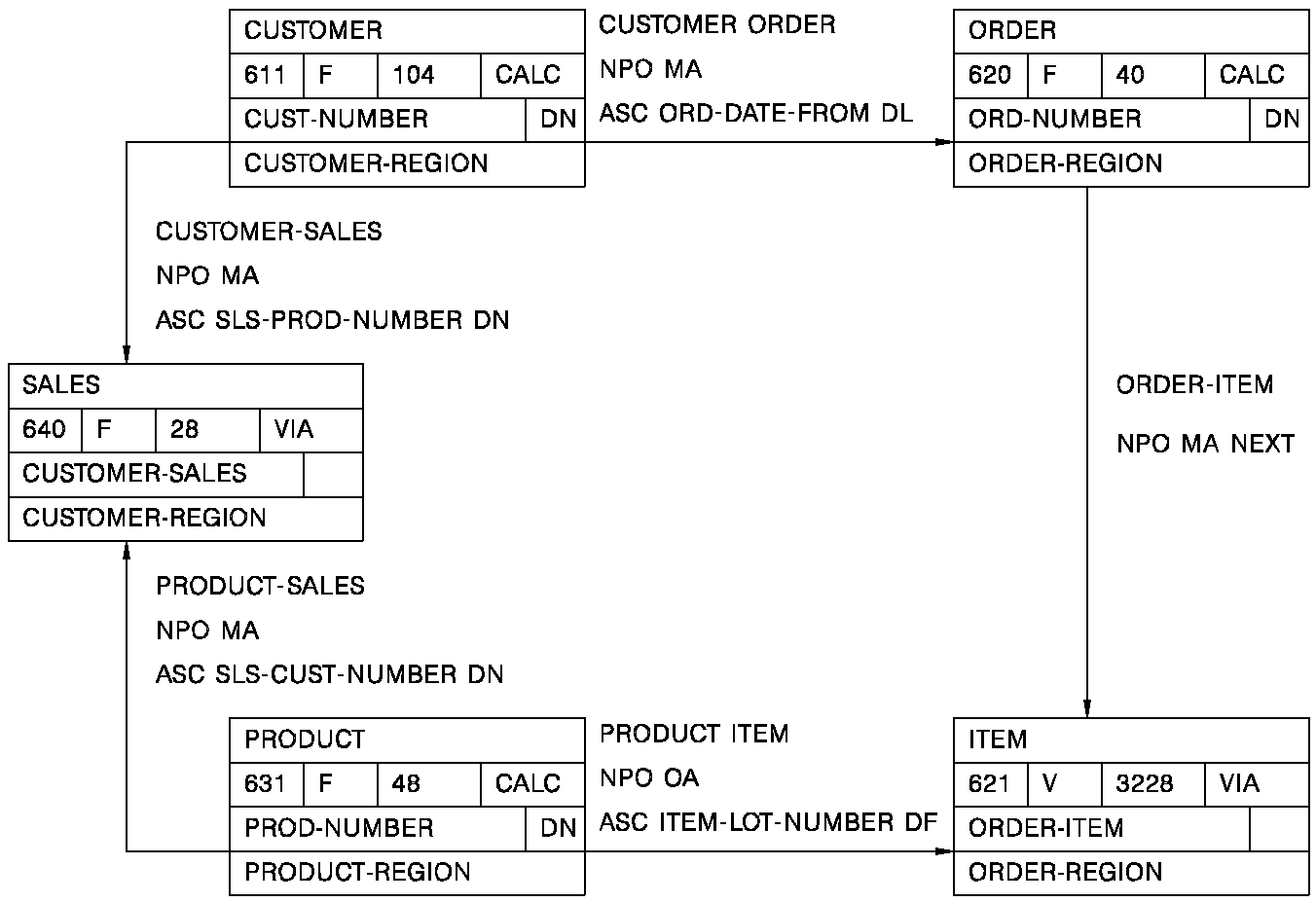
The records are identified as follows:
              Source Record             Derivation Source #

              CUSTOMER                       01
              SALES                          02
              PRODUCT                        03
              ITEM                           04
              ORDER                          05
The join information is entered as follows:
    Column #1/Set     Of Der   Oper         Column #2      Of Der

    CUSTOMER-SALES       01      ST                           02
    PRODUCT-SALES        03      ST                           02
    PRODUCT-ITEM         03      ST                           04
    ORDER-ITEM           05      ST                           04
    CUSTOMER-ORDER       01      ST                           05
The CUSTOMER-ORDER set join would not be allowed because the CUSTOMER and ORDER records are already indirectly joined through the previously defined set relationships.
When you derive a view from non-SQL defined records, the elements of the schema records become the columns for the view. The following considerations apply:
02  REGION
    OCCURS 3.
    04 REGIONAL-MANAGER   PIC X(20).
    04 SALES-MANAGER      PIC X(20)
       OCCURS 2.
The above element would result in the following columns:
REGION.1
REGIONAL-MANAGER.1
SALES-MANAGER.1.1
SALES-MANAGER.1.2
REGION.2
REGIONAL-MANAGER.2
SALES-MANAGER.2.1
SALES-MANAGER.2.2
REGION.3
REGIONAL-MANAGER.3
SALES-MANAGER.3.1
SALES-MANAGER.3.2
Note: Varying OCCURS clauses (for example, OCCURS DEPENDING ON) are not supported by ASF.
Multiple levels of OCCURS clauses, such as the SALES-MANAGER columns above, are supported by ASF. Online mapping, which creates the screen format for the ASF-generated application, supports first-level OCCURS clauses only. The SALES-MANAGER columns are part of the table definition, but cannot be displayed online through the ASF-generated application.
Note: Views derived from non-SQL defined records cannot be used as source tables for other views.
|
Copyright © 2014 CA.
All rights reserved.
|
|