

ASF Processing › Table Definition
Table Definition
Definition Records Defined
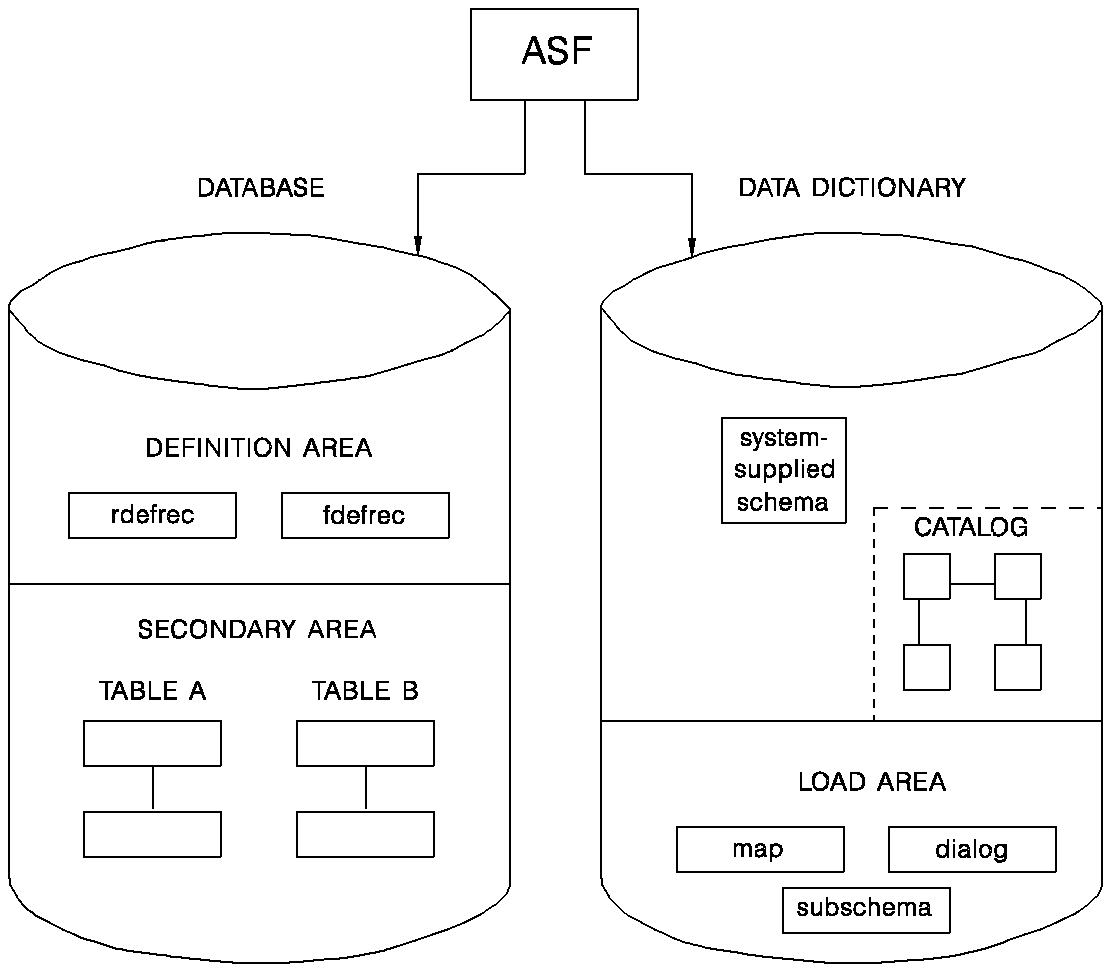
Tables created through ASF are defined in a system-supplied schema named IDMSR. The schema IDMSR is provided at installation. When installed, it contains the definitions of definition records, which are used to store table definitions. The following definition records are defined in the system-supplied IDMSR schema:
- RDEFREC—Defines a table.
- FDEFREC—Defines the external column characteristics of a stored table.
- EDEFREC—Specifies the internal column (field) characteristics of a stored table.
- RDERREC—Specifies derivation information. This record is used to connect columns in views to the tables from which the views were derived. Additionally, this record specifies if the view is derived from a stored table or a stored non-SQL defined record.
- NDERREC—Identifies a table definition that was derived from a stored record.
- JOINREC—Specifies the information necessary to connect two RDERRECs together with join criteria. This construct provides the information necessary to build a logical-record path for accessing the source records.
- RSELREC—Saves selection criteria during table definition.
- WHERREC—Contains selection criteria used to build logical-record path DML commands.
- VALUREC—Contains calculations defined for columns in the table.
- KEYHREC—Defines an index key for a table.
- KEYEREC—Defines the elements in an index key.
- GCTLREC—Contains ASF system defaults and control information.
- AREAREC—Defines an area managed by ASF.
- RIDSREC—Contains a list of available record IDs.
- RDNSREC—Contains a list of available table definition numbers.
- ORGNREC—Defines the characteristics of a stored table as it relates to a logical record.
Definition Records Have Owners
Each definition record has a corresponding owner record. The first four characters of the owner record name are the same as the first four characters of the member record name. The last three characters of each owner record name are OWN. For example, the owner of the RDEFREC record is named RDEFOWN.
The definition records and their owners are stored in the definition area of the database.
User and Table Catalog
The catalog, which is part of the data dictionary, is a directory of users and tables. ASF references and updates the catalog as it defines data tables. In CA-ICMS installations, ASF and CA-ICMS share the same catalog. The figure below illustrates the dictionary and database components required by ASF.
Defining Tables
As you go through the table definition process, the following steps take place:
- When you enter a table name on the Activity Selection screen, ASF checks the catalog to see if the table exists. If the table does not exist, ASF instructs you to proceed with the table definition.
- When you press [Enter] from the Table Definition screen, ASF adds the table. Selecting a function, such as Define Columns, also causes the table to be added. ASF adds the table as follows:
- ASF assigns the table a table definition number.
- Using the table definition number to identify the table, ASF adds an occurrence of the Record Definition record (RDEFREC).
- The table name and definition number are entered in the catalog.
- As you define the characteristics of the table, ASF adds occurrences to the appropriate definition records. For example:
- One FDEFREC occurrence is added for each column in the table.
- One KEYHREC occurrence is added for each index key defined for the table.
The definition records store the table specifications you enter through ASF.
Copyright © 2014 CA.
All rights reserved.
|
|