

You defined a prototype Department application in Part II of this manual. You executed this prototype to test out the flow of control between application functions at runtime. Executing the prototype enabled you to see how screens are displayed to users.
Because you have not yet written any process commands to access the database, the prototype Department application does not retrieve or store data in the database. For example, sample department data that you type on the screen while viewing the ADDDEP function does not get stored in the database when you press [Enter].
In CA ADS, components of a prototype application can be developed directly into the production application. In Part III of this manual, you will complete the Department application so that it is fully functional. To do this, you will add modules of process commands to dialogs XXXDADD and XXXDUPD, which you defined in Part II. The process modules that you define for these dialogs will allow users to store, display, modify, and delete department records in the database.
In this chapter, you will define the two process modules required for dialog XXXDADD. This chapter includes:
Because CA ADS is a fourth-generation application development system, major portions of a CA ADS application can be defined without writing any code. For example, you defined the entire Department application prototype in Part II of this manual without writing any code.
To enable dialogs to perform runtime processing, you define modules of process commands for the dialogs. For example, you can define process modules to retrieve and display database information, to display messages, to receive input from users, and to evaluate and store valid data.
Process Language
You write process modules by using the CA ADS process language. This language incorporates all the processing capabilities found in a traditional programming language. For example, you can evaluate strings, perform arithmetic functions, and perform conditional tests and loops. Additionally, the CA ADS process language benefits from complete integration with the CA ADS environment.
Categories of Process Commands
The following table lists categories of process commands. For detailed information on process commands, see the CA ADS Reference Guide.
|
Category of command |
Capabilities |
|---|---|
|
Arithmetic and assignment |
Perform calculations and move data |
|
Conditional |
Perform testing and looping |
|
Control |
Specify the next application component executed, govern data passed to that component, and display maps |
|
Database |
Perform database retrieval and update functions and specify recovery options |
|
Map modification |
Request temporary or permanent changes to a map at runtime |
|
Pageable map |
Create, display, and retrieve sets of fields (detail occurrences) for a pageable map |
|
Queue and scratch management |
Define and access temporary disk storage |
|
Subroutine control |
Define and call subroutines |
|
Utility |
Retrieve runtime system status information, request memory dumps, initialize record buffers, direct output to a printer, and display diagnostic information |
Process Modules
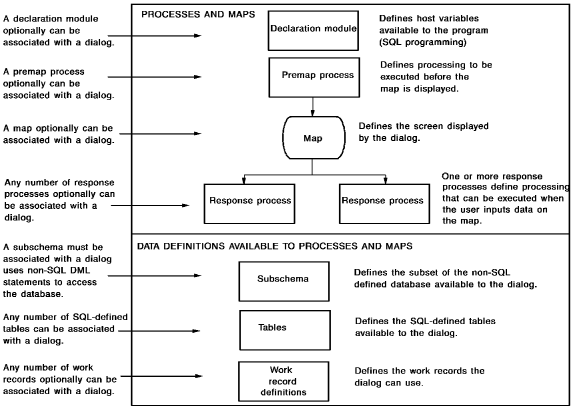
Process modules can be executed before and after the dialog's map is displayed to the user.
Premap Process
The process module is called a premap process when executed before the map. A dialog can have a maximum of one premap process.
A premap process typically includes commands that prepare the map for display. For example, commands in a premap process can retrieve stored values from the database and then display the values along with a message on the dialog's map.
Response Process
The process module is called a response process when executed after the map. A dialog can have any number of response processes. The response process executed at runtime is determined by actions that the user takes when inputting data on the map.
A response process typically includes commands that accept end-user input for evaluation and storage.
Declaration Module
A dialog can have a maximum of one declaration module. The modules is not executed, but contains declaration statements for SQL that are used during dialog compilation.
For information on declaration statements, see CA IDMS SQL Programming Guide.
Accessing the Database
Some process modules access the database; for example, to store a new department record.
Process modules accessing a non-SQL defined database can use SQL DML statements or non-SQL DML statements to access that data. Process modules accessing an SQL-defined database can use SQL DML statements.
A dialog using non-SQL DML statements to access a non-SQL defined database must know which portion of the database to access at runtime. You supply this information by adding a predefined subset of the database (that is, a subschema) with the dialog. The subschema that you name for dialog XXXDADD, for example, identifies the portion of the sample database that contains the DEPARTMENT record. Subschemas usually are defined by database administrators (DBAs) at a site.
A dialog that uses SQL statements to access an SQL-defined (or non-SQL defined) database will access tables that have been defined through SQL statements. To execute the SQL statements, an access module must be created based on the SQL statements in one or more programs. The access module is created after dialog compilation; it does not have to be predefined.
Note: For more information about programming using SQL DML statements, see CA IDMS SQL Programming Guide and CA IDMS SQL Reference Guide. For more information about programming using non-SQL DML statements, see CA ADS Reference Guide and CA IDMS Navigational DML Programming Guide.
Work Records
You also can have work records associated with a map or associated directly with a dialog. A work record does not participate in a subschema. Data defined by work records is not stored in the database. You will not add a work record to dialog XXXDADD.
The following figure shows the components of a fully developed dialog:
Integrated Data Dictionary
As an application developer, you define premap and response processes by using the Integrated Data Dictionary (IDD) menu facility.
You will use IDD in this chapter to define one premap process (XXXDADD-PREMAP) and one response process (XXXDADD-RESPONSE) for dialog XXXDADD:
Dialog Compiler
When you finish using IDD to define process modules, you use the CA ADS Catalog compiler (ADSC) to associate the process modules with dialogs. For example, after you use IDD to define process modules XXXDADD-PREMAP and XXXDADD-RESPONSE, you use ADSC to associate these process modules with dialog XXXDADD.
Enhancing Sample Application Dialogs
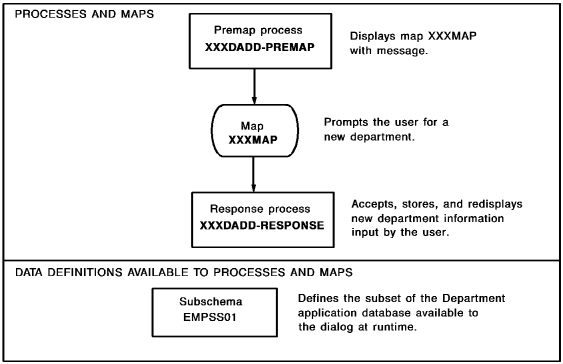
In this chapter, you will enhance dialog XXXDADD by adding a premap process, response process, and subschema to the dialog, as shown below. Process modules XXXDADD-PREMAP and XXXDADD-RESPONSE perform all processing required for dialog XXXDADD. Subschema EMPSS01 specifies the portion of the database available to process XXXDADD-RESPONSE, which stores department data in the database.
|
Process name |
Type |
Function |
|---|---|---|
|
XXXDADD-PREMAP |
Premap |
Displays the dialog's map with a message |
|
XXXDADD-RESPONSE |
Response |
Accepts department information supplied by the end user on the map; stores new department information in the database; redisplays the stored input to the user with a confirming message |
Steps for defining process modules and associating the modules and a subschema with a dialog are discussed below.
This section contains the following topics:
Defining Process Modules Using IDD
Adding Process Modules to Dialogs Using ADSC
|
Copyright © 2013 CA.
All rights reserved.
|
|