

As the next step in defining an application, you define dialogs by using the CA ADS dialog compiler (ADSC). The XXXDADD and XXXDUPD dialogs defined in this chapter are intended for use in the Department application introduced in Chapter 7, "Overview of CA ADS Application Development".
This chapter includes:
To complete the prototype Department application, you need to define dialogs for the ADDDEP, MODDEP, and DELDEP dialog functions that you created in Chapter 8, "Defining an Application Structure Using ADSA". When you created ADDDEP, you named XXXDADD as the associated dialog. When you created the MODDEP and DELDEP dialog functions, you named XXXDUPD as the associated dialog for each function. The XXXDADD and XXXDUPD dialogs did not exist when you named them in Chapter 8.
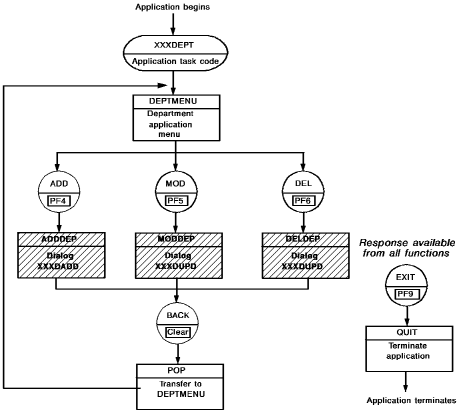
In this chapter, you will define the dialogs XXXDADD and XXXDUPD. The diagram below shows how XXXDADD and XXXDUPD fit into the Department application. Function ADDDEP invokes dialog XXXDADD at runtime. Both MODDEP and DELDEP invoke dialog XXXDUPD.
Note: You can substitute your initials for XXX in the dialog names.
What is a Dialog
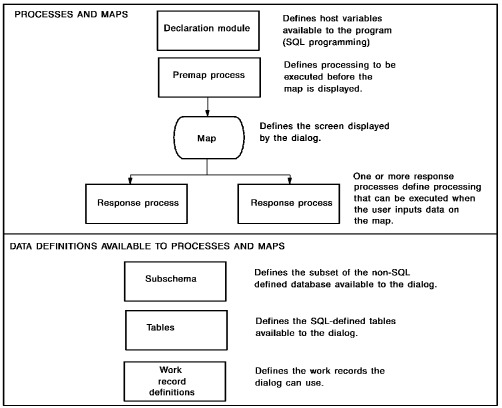
A dialog is an executable module that consists of components defined by using other development tools. For example, a dialog can include a map defined using MAPC, and modules of process code defined using the IDD menu facility.
At runtime, a dialog:
Dialogs in the Department Application
For example, in the Department application:
Process code can be executed both before the dialog's screen is displayed and after user input is retrieved.
Runtime Execution
Dialogs are executed at runtime whenever control passes to the dialog functions with which they are associated. For example, you associated dialog XXXDADD with the ADDDEP dialog function when you defined ADDDEP in Dialog functions. At runtime, dialog XXXDADD will be executed whenever a user invokes the ADDDEP function.
Note: It is possible to create mapless dialogs that consist only of process logic. For example, a mapless dialog can be defined to perform database operations. You will not create any mapless dialogs for the sample Department application.
Dialog Components
As shown in the diagram, a dialog can consist of several components. When you are developing dialogs for a prototype application, it is only necessary to include maps in the dialogs. Defining basic, skeleton dialogs for a prototype application allows users to execute the application and review the screen displays. Later in the application development cycle, you define process modules that perform processing for the dialogs.
In this chapter, you will define skeleton dialogs by using the CA ADS dialog compiler (ADSC). A typical ADSC screen is shown below:
 ┌─
 │     Add  Modify  Compile  Delete  Display  Switch
 └─ .____________________________________________________________________.

                                CA ADS Online Dialog Compiler

                            CA, Inc.
 ┌─
 │
 │
 │     Dialog name . . . . . . .   ________
 │     Dialog version  . . . . .   ____
 │     Dictionary name . . . . .   ________
 │     Dictionary node . . . . .   ________
 └─
 ┌─    Screen  . . . . . . . . .   1  1. General options
 │                                    2. Assign maps
 │                                    3. Assign database
 │                                    4. Assign records and tables
 │                                    5. Assign process modules
 └─
             Copyright (C) 2003 CA, Inc.

  Command ===>
  Enter  F1=Help  F3=Exit  F10=Action
This section contains the following topics:
Instructions For Defining Dialogs
Instructions For Executing the Application
|
Copyright © 2013 CA.
All rights reserved.
|
|