

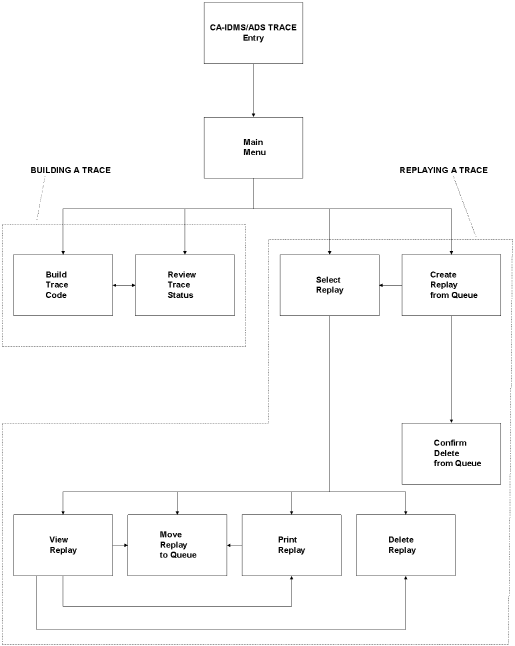
Program Function (PF) keys provide easy movement to another level or to scroll within a series of screens with more than one screen of data. PF3 through PF8 are not listed on the screens. The functions are described in following table and diagram.
|
Key |
Meaning |
Function |
|---|---|---|
|
CLEAR |
EXIT |
Exit to CA-IDMS. |
|
PF1 or PF13 |
Review Status |
Jump to Review Trace Status from Build Trace Code screen. |
|
PF2 or PF14 |
Build Code |
Jump to Build trace code screen from Review Trace Status screen. |
|
PF3 or PF15 |
END |
Exit to the next higher level. Select Replay from Delete Replay, Print Replay, Move Replay, or View Replay. To Create Replay from Confirm Delete. |
|
PF4 or PF16 |
RETURN |
Return to the CA ADS Trace Main Menu. |
|
PF5 or PF17 |
TOP |
In a series of screens, go to the first page of the current display. |
|
PF6 or PF18 |
BOTTOM |
In a series of screens, go to the last page of the current display. |
|
PF7 or PF19 |
UP |
Move the "window" one page toward the first page of the current display. CA ADS Trace replay screens indicate the current page and the number of pages in the series. Also used with SKIP and SEARCH commands. |
|
PF8 or PF20 |
DOWN |
Move the "window" one page toward the last page of current display. CA ADS Trace replay screens indicate the current page and the number of pages in the series. Also used with SKIP and SEARCH commands. |
|
PF9 or PF21 |
Select Replay |
Jump to Select Replay from Create Replay. |
|
PF10 or PF22 |
Move Replay |
Jump to Move Replay from View Replay or from Print Replay. |
|
PF11 or PF23 |
Print Replay |
Jump to Print Replay from View Replay. |
|
PF12 or PF24 |
Delete Replay |
Jump to Delete Replay from View Replay. |
|
Copyright © 2013 CA.
All rights reserved.
|
|