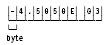
A data type is the internal representation of data. Data referenced by CA ADS process statements must be predefined in the data dictionary using IDD alone or IDD and the DDL compiler. The data types supported by CA ADS are described below. Examples of each data type are outlined later in this chapter.
Note: CA ADS does not support edited data numeric fields. Therefore, PICTURE clauses on elements in records used in CA ADS dialogs cannot include edit characters such as $, Z, period, comma, or +.
For more information about the correlation between CA ADS data types and SQL data types, see the CA IDMS SQL Reference Guide and the CA IDMS SQL Programming Guide.
Binary
Binary data fields are 1- to 18-digit signed integer data fields. The left-most bit in a binary field is zero for a positive integer and one for a negative integer. The remainder of the binary field contains the numeric value. A negative value is stored in twos complement form.
The following table describes the characteristics of binary data fields and shows how each type of binary field is defined in the data dictionary.
|
Binary Field |
Size |
Range |
Data dictionary definition |
|---|---|---|---|
|
Halfword |
2 bytes |
-215 to 215-1 |
PICTURE S9(n) USAGE IS COMPUTATIONAL (n is an integer ranging from 1 to 4) |
|
Fullword |
4 bytes |
-231 to 231-1 |
PICTURE S9(n) USAGE IS COMPUTATIONAL (n is an integer ranging from 5 to 9) |
|
Doubleword |
8 bytes |
-263 to 263-1 |
PICTURE S9(n) USAGE IS COMPUTATIONAL (n is an integer ranging from 10 to 18) |
EBCDIC
EBCDIC data fields are data fields containing any value in the EBCDIC collating sequence (hexadecimal '00' through 'FF').
The following table describes the characteristics of EBCDIC data field and shows how it is defined in the data dictionary.
|
Size |
Maximum length |
Data dictionary definition |
|---|---|---|
|
1 byte per character |
32,767 bytes |
PICTURE X USAGE IS DISPLAY |
Floating Point
A floating point data field is a numeric data field whose value is expressed as a mantissa, which represents the number, and an exponent (characteristic), which determines the actual decimal position of the number. The value of a floating point data field is the product of the mantissa, and ten raised to the power of the characteristic. A 1- to 16-digit mantissa can be used.
The following table describes the characteristics of floating point data fields and shows how each field is defined in the data dictionary.
|
Data Field |
Size |
Exponent range |
Data dictionary definition |
|---|---|---|---|
|
Internal short1 |
4 bytes2 |
-64 to +63 |
USAGE IS COMPUTATIONAL-1 (No picture clause) |
|
Internal long1 |
8 bytes2 |
-64 to +63 |
USAGE IS COMPUTATIONAL-2 (No picture clause) |
|
Display3 |
1 byte for each character |
-64 to +63 |
PICTURE &plusmin.9V99E&plusmin.99 USAGE IS DISPLAY |
Notes:
Group
Group data fields, including record names, contain subordinate data fields. A group data field references the storage of all subordinate data fields without consideration of their data types. A group data field has no PICTURE or USAGE clauses.
Multibit Binary
Multibit data fields are binary data fields. At runtime, the data fields contain either a 0 or 1 for each character.
The following table describes the characteristics of a multibit binary field and shows how the field is defined in the data dictionary.
|
Data field |
Size |
Exponent range |
Data dictionary definition |
|---|---|---|---|
|
Multibit binary |
1 bit per character |
1- to 32- characters |
PICTURE X USAGE IS BIT |
Packed Decimal
Packed decimal numeric data fields occupy a half byte of storage per digit. The sign of the number (hexadecimal C, for positive, D for negative, and F for no sign) is stored in the four low-order bits of the rightmost byte. S is used only when the field is signed.
If a packed decimal field is defined with an even number of digits, the field is considered to have one extra digit to the left of the decimal point. For example, a packed decimal field with a picture of 9(4)V99 is considered to have a picture of 9(5)V99.
A packed decimal field with a picture of 9(4)V99 or S9(4)V99 occupies a half byte for the sign and a half byte for each digit, totaling 3.5 bytes. Four bytes are reserved for this field, adding an extra digit to the left of the decimal point.
The following table describes the characteristics of a packed decimal data field and shows how the field is defined in the data dictionary.
|
Data field |
Size |
Range |
Data dictionary definition |
|---|---|---|---|
|
Packed decimal |
1/2 byte per digit |
1 to 18 digits |
PICTURE S9V99 USAGE IS COMPUTATIONAL-3 |
Zoned Decimal
Zoned decimal numeric data fields occupy one byte of storage per digit. The sign of the number (hexadecimal C for positive, D for negative, F for unsigned positive) is stored in the four high-order bits of the rightmost digit. S is used only when the field is signed.
The following table describes the characteristics of a zoned decimal data field and how the field is defined in the data dictionary.
|
Data field |
Size |
Range |
Data dictionary definition |
|---|---|---|---|
|
Zoned decimal |
1 byte per digit |
1 to 18 digits |
PICTURE S9V99 USAGE IS DISPLAY |
Examples of Data Types
The following table illustrates the definition, use, and internal representation of the different data types.
|
Type |
Description1 |
Command |
|---|---|---|
|
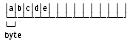
Group
|
EMPLOYEE ← Group item EMP-ID 9(4). EMP-NAME PIC X(10). |
MOVE 'abcde' TO EMPLOYEE. |
|
Internal representation:2 |
|
|
|
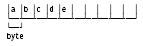
EBCDIC
|
FIELD-1 PIC X(10). |
MOVE 'abcde' TO EMPLOYEE. |
|
Internal representation: |
|
|
|
Zoned decimal
|
AMT-1 PIC 9(4). |
MOVE 4505 TO AMT-1. |
|
Internal representation: |
|
|
|
AMT-1 PIC S9(4). |
MOVE 4505 TO AMT-1. |
|
|
Internal representation: |
|
|
|
Packed decimal
|
AMT-1 PIC 9(4) USAGE COMP-3. |
MOVE 4505 TO AMT-1. |
|
Internal representation: |
|
|
|
AMT-1 PIC S9(4) USAGE COMP-3. |
MOVE 4505 TO AMT-1. |
|
|
Internal representation: |
|
|
|
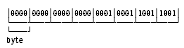
Binary
|
AMT-1 PIC S9(8) USAGE COMP. |
MOVE 4505 TO AMT-1. |
|
Internal representation: |
|
|
|
AMT-1 PIC S9(8) USAGE COMP. |
MOVE -4505 TO AMT-1. |
|
|
Internal representation: |
|
|
|
Mulitibit binary
|
FIELD-1 PIC X(10) USAGE BIT. |
MOVE B'10011100' TO FIELD-1. |
|
Internal representation: |
|
|
|
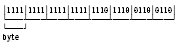
Floating point
|
AMT-1 USAGE COMP-1. (Internal short) |
MOVE -45.05E02 TO AMT-1. (Value will be stored as -4505E04) |
|
Internal representation: |
|
|
|
AMT-1 PIC S9.9999 E-99. |
MOVE -45.05 E 02 TO AMT-1. |
|
|
Internal representation: |
|
Note:
1 If no USAGE clause is provided, the default usage is DISPLAY.
2 A blank space = a blank (X'40') in internal representations.
|
Copyright © 2014 CA.
All rights reserved.
|
|