

Dialog
ADSC brings various application components together into a modular entity (dialog) that is executed at runtime. The table below lists the components of a dialog and describes what each component does. ADSC screens prompt for names of dialog components and other information needed to define the dialog for an online or batch application.
ADSOBCOM is a utility that can be used to define and recompile several dialogs in batch mode. This capability is particularly useful when dialogs need to be recompiled because maps, processes, subschemas, or records associated with several dialogs are modified.
Components of a dialog
|
Dialog component |
What it does |
|---|---|
|
Map |
Provides the means of communication between one data source and the application |
|
Subschema |
Provides the dialog's view of the database |
|
Access module |
Provides optimized access to an SQL-defined database |
|
Records |
Describe the data used by the dialog and map |
|
Subschema records |
Allow the dialog to read and write information to the database |
|
Dialog work records |
Provide temporary storage to be used by dialogs and maps |
|
Process modules |
Define the processing the dialog performs at runtime |
|
Premap process (optional, maximum of one per dialog) |
Defines processing that prepares the screen for display |
|
Response process (optional, any number per dialog) |
Defines processing that occurs after the end user presses a control key (such as Enter or PF1) in response to the dialog's map |
|
Declaration module (optional, maximum of one per dialog)
|
Specifies SQL cursor and WHENEVER declarations (for SQL error processing) See the CA IDMS SQL Programming Guide. |
In an online application, a dialog interacts with the end user by displaying a screen and allowing the user to view and input information.
Interaction between dialog and end user at runtime
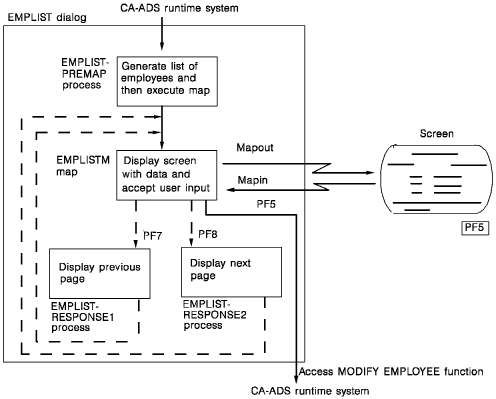
The following diagram shows the interaction between the dialog and the end user at runtime. In the EMPLIST dialog, the premap process generates a list of employee names. The screen defined by the EMPLISTM map displays a page of names. The user can respond by paging backward or forward by pressing PF7 or PF8. Pressing PF5 accesses the MODIFY EMPLOYEE function.
CA ADS dialog at run time
|
Copyright © 2014 CA.
All rights reserved.
|
|