

Flow of control is the way control is passed from one application function or dialog to another at runtime. In CA ADS, the runtime flow of control is determined by user requests or runtime events, based on specifications made at definition time.
AGR-CURRENT-RESPONSE
The CA ADS runtime system uses the AGR-CURRENT-RESPONSE field of ADSO-APPLICATION-GLOBAL-RECORD to direct the flow of control in applications defined by using the application compiler.
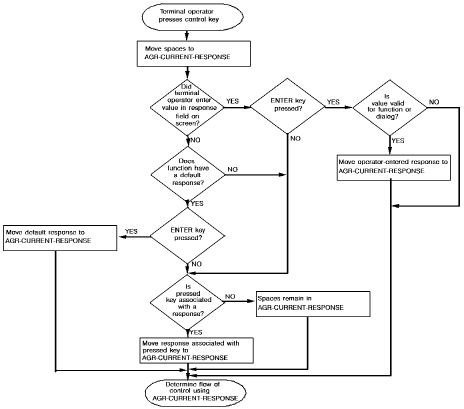
When the user presses a control key, the value of AGR-CURRENT-RESPONSE is established by means of the following steps:
The following diagram shows how the runtime system establishes the value of AGR-CURRENT-RESPONSE.
Note: When a series of dialogs that are not associated with application functions is executed as an application, the flow of control is directed by the control commands coded in the premap and response processes. The control commands specify, either explicitly or implicitly, the next component to be executed.
Establishing the Value of AGR-CURRENT-RESPONSE
Valid Response
If the response established in AGR-CURRENT-RESPONSE is valid for the current function, the runtime system moves the name of the function associated with the response to the AGR-NEXT-FUNCTION field of ADSO-APPLICATION-GLOBAL-RECORD.
For responses with a security class higher than zero, the runtime system also checks whether the terminal operator has an acceptable security class. If the user does not have an acceptable security class, the current screen is redisplayed with a message indicating that a different response must be selected.
Note: Process code can move values to the AGR-CURRENT-RESPONSE field, overwriting the response selected by the user. The runtime system does not check security for a response moved to the AGR-CURRENT- RESPONSE field in process code. A process code value is executed if it is valid for the current function.
The response moved to AGR-CURRENT-RESPONSE establishes the next function to be executed. The function is not executed, however, until the runtime system satisfies certain criteria. The following diagram shows how the flow of control is directed within an application at runtime.
Application Flow of Control
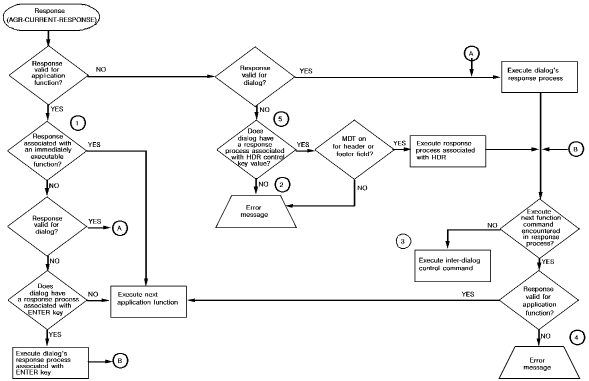
Notes:
UNACCEPTABLE RESPONSE. PLEASE TRY AGAIN.
INVALID RESPONSE SPECIFIED BY DIALOG PROCESS CODE
Default Control Key Assignments
At system generation, default control key assignments can be specified for certain formats of the LEAVE and RETURN process commands. By default, PA1 is assigned to LEAVE APPLICATION; CLEAR is assigned to RETURN CLEAR. At runtime, the user can press these keys to perform their associated commands.
Note: For more information on defining default control key assignments, see the discussion of the KEYS statement in the CA IDMS System Generation Guide.
Default control key assignments are overridden by control key assignments specified for application responses and dialog response processes.
|
Copyright © 2014 CA.
All rights reserved.
|
|