

The employee-record report application produces a report of employees by department. Sample output is shown below:
Sample Output
FC10001                             FICTIONAL COMPANY, INC.                     DATE      PAGE
                                  EMPLOYEE LISTING BY DEPARTMENT               11/05/99     1

DEPARTMENT ID: 5200    THERMOREGULATION

                 EMP ID  ──NAME--                STATUS   SOC SEC   START DATE   TERM DATE

                 0479    CLOTH        TERRY      ACT     028701666  11/02/79     00/00/00
                 0329    FINN         PHINEAS    ACT     011787878  06/16/79     00/00/00
                 0469    KASPAR       JOE        LOA     036768888  06/05/82     00/00/00
                 4014    SHEPARD      LISA       UNK     000000000  00/00/00     00/00/00
                 0355    TIME         MARK       ACT     034560128  05/05/84     00/00/00
                 0439    WILCO        ROGER      ACT     111000023  11/11/79     00/00/00

                                                           DEPARTMENT 5200 TOTAL EMPLOYEES:  6
DEPARTMENT ID: 3100    INTERNAL SOFTWARE

                 EMP ID  ──NAME--                STATUS   SOC SEC   START DATE   TERM DATE

                 0024    DOUGH        JANE       ACT     022337878  08/08/76     00/00/00
                 0029    GALLWAY      JAMES      ACT     014567777  10/10/81     00/00/00
                 0003    GARFIELD     JENNIFER   ACT     021994516  01/21/77     00/00/00
                 0028    GRANGER      PERCY      ACT     011234545  05/27/83     00/00/00
                 0027    HEAROWITZ    VLADIMIR   ACT     031896154  09/09/89     00/00/00
                 0020    JACOBI       JAMES      ACT     018813465  11/11/89     00/00/00
                 0019    JENSEN       JULIE      ACT     033456718  09/29/82     00/00/00
                 0035    LITERATA     LARRY      ACT     023567831  09/09/80     00/00/00
                 0023    O'HEARN      KATHERINE  ACT     019556712  05/04/78     00/00/00
                 0021    TYRO         RALPH      ACT     019893456  12/12/21     00/00/00

                                                           DEPARTMENT 3100 TOTAL EMPLOYEES:  10

                                                           TOTAL EMPLOYEES ALL DEPARTMENTS:  61
Employee-record Flow Example
The diagram below shows the file access, components, and flow of control for the application.
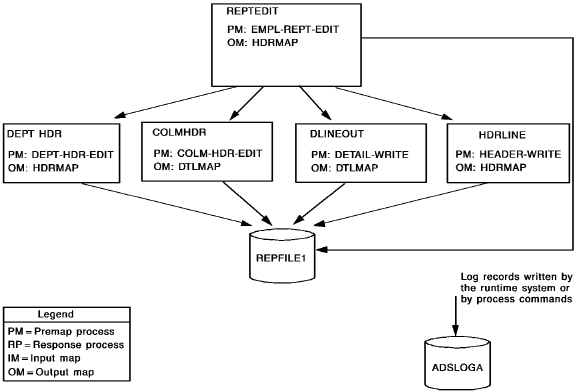
Files Accessed
This application accesses the following files.
|
Name |
Type |
Description |
|---|---|---|
|
REPFILE1 |
Output file |
Contains the report |
|
ADSLOGA |
Log file |
Contains informational and error messages produced by the application |
Dialogs
The application consists of the following dialogs.
|
Name |
Description |
|---|---|
|
REPTEDIT |
Acts as the mainline routine for the application, reading database records and passing control to other dialogs as required; writes department and report total lines, as shown below: DEPARTMENT 3100 TOTAL EMPLOYEES: 10
TOTAL EMPLOYEES ALL DEPARTMENTS: 61 |
|
DEPTHDR |
Writes department header lines, as shown below: DEPARTMENT ID: 5200 ... |
|
COLMHDR |
Writes detail column header lines, as shown below: EMP ID ──NAME-- ... |
|
DLINEOUT
|
Writes detail lines, as shown below: 0479 CLOTH TERRY ... |
|
HDRLINE |
Writes page header lines, as shown below: FICTIONAL COMPANY, INC ... EMPLOYEE LISTING BY DEPARTMENT ... |
Steps
To create the application, you perform the following steps:
Note that you do not have to describe the report file in the data dictionary; you can use file entity IDD-REPFILE1, which you already described as part of the archive application.
The steps you perform to define the report application are described below, followed by a discussion of executing the application.
|
Copyright © 2013 CA.
All rights reserved.
|
|