

The employee-record restore application restores selected employee records and their associated coverage records from an archive file (created in the employee-record archive application) to an CA IDMS/DB database. The following drawing shows the file access, components, and flow of control for the application.
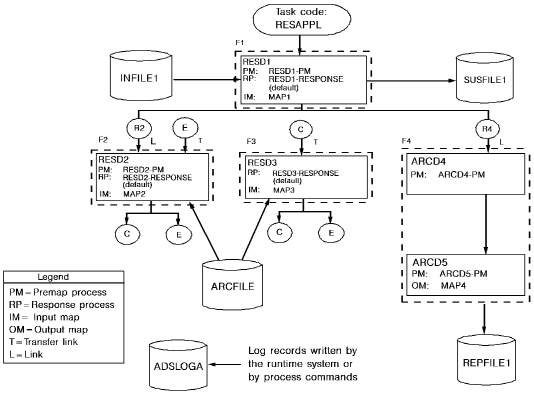
The files accessed by this application are the same as those accessed in the archive application. ARCFILE, which was an output file in the archive application, is an input file in the restore application.
The restore application uses a global application structure defined with the application generator. In the drawing above, functions are represented by dotted rectangles; responses are represented by circles.
The application structure enables the application to access an input file that has more than one record layout (ARCFILE). The structure ensures that type E (employee) records are mapped in by dialog RESD2, and that type C (coverage) records are mapped in by dialog RESD3.
Processing
At runtime, the following processing occurs when RESD2 or RESD3 reads a record from the archive file:
Dialogs Used
The dialogs used in the application are described below.
|
Dialog |
Description |
|---|---|
|
RESD1 |
Reads input records and acts as a mainline routine, passing control (by means of the application structure) to dialogs RESD2 and ARCD4, as required by the application; writes erroneous input records to a suspense file |
|
RESD2 |
Finds the requested employee record in the archive file; restores the record; performs another read operation to begin reading associated coverage records; if a coverage record is read, control passes automatically to dialog RESD3; returns control to RESD1 when all associated coverage records have been restored |
|
RESD3 |
Restores coverage records associated with the restored employee record; if an employee record is read, control passes automatically back to dialog RESD2 |
|
ARCD4 and ARCD5 |
Write transaction report lines to an output file |
Steps
To create the application, you perform the following steps:
Note that you do not define the files, records, and file maps used by the application, nor do you define dialogs ARCD4 and ARCD5; you already defined these components as part of the archive application.
The steps you perform to define the restore application are described on the following pages, followed by a discussion of executing the application.
|
Copyright © 2013 CA.
All rights reserved.
|
|