

The employee-record archive application writes selected employee records and their associated coverage records from an CA IDMS/DB database to an output file. The following diagram shows the file access, components, and flow of control for the application.
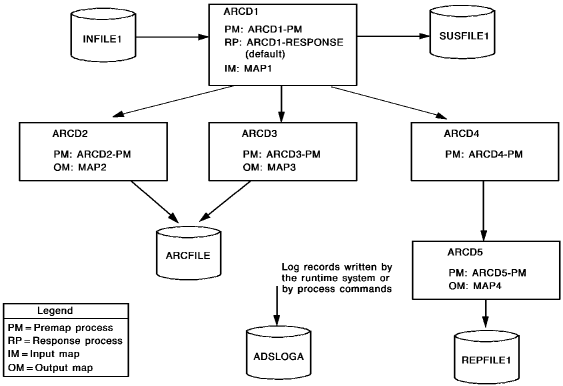
The files accessed and the dialogs used by the application are as follows.
Files
|
Name |
Type |
Description |
|---|---|---|
|
INFILE1 |
Input file |
Contains the ids of employee records to be archived |
|
SUSFILE1 |
Suspense file |
Contains records from INFILE1 found in error |
|
ARCFILE |
Output file |
Contains archived employee records and their associated coverage records |
|
REPFILE1 |
Output file |
Contains a transaction summary report for the application |
|
ADSLOGA |
Log file |
Contains informational and error messages produced by the application |
Dialogs
|
Name |
Description |
|---|---|
|
ARCD1 |
Reads input records and acts as a mainline routine, passing control to dialogs ARCD2, ARCD3, and ARCD4, as required by the application; writes erroneous input records to the suspense file |
|
ARCD2 |
Writes an employee record to the archive file, then returns control to ARCD1 |
|
ARCD3 |
Writes the coverage records associated with an archived employee record to the archive file, then returns control to ARCD1 |
|
ARCD4 |
Determines the transaction report lines to be written to the report output file; for each line to be written, passes control to ARCD5; returns control to ARCD1 after all lines for the transaction have been written |
|
ARCD5 |
Writes a report line to the report output file, then returns control to ARCD4 |
Steps to create the application
To create the application, you perform the following steps:
These steps are described below, followed by a discussion of executing the application.
|
Copyright © 2013 CA.
All rights reserved.
|
|