

Dialog Execution
Batch dialog execution is similar to online dialog execution: a batch dialog executes premap and response processes and performs mapin and mapout operations. The major difference between batch and online dialogs is in the sequence and handling of the mapin (read) and mapout (write) operations.
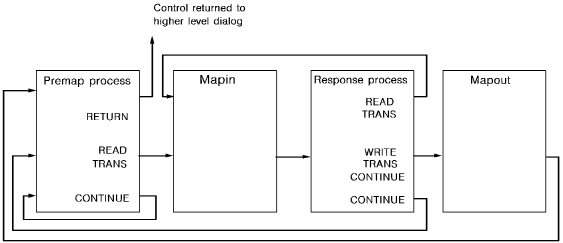
The diagram below shows a typical batch dialog. The dialog reads from an input file and writes to an output file.

Premap Process
The premap process is executed at the beginning of the dialog, unless the dialog's entry point is its mapin operation. The process executes until it issues a control command, including a READ TRANSACTION or WRITE TRANSACTION command. In the example shown above, a READ TRANSACTION command is issued, which terminates the process and passes control to the mapin operation.
Mapin Operation
The mapin operation is performed in any of the following cases:
The mapin operation performs the following functions:
Note: If the application is defined using the application compiler, the runtime system first examines the response field of the record and passes control to another application function, if required. Application execution using the application compiler is described later in this chapter.
Response Process
The selected response process is executed after the mapin operation. The response process executes until it issues a control command, including a batch READ TRANSACTION or WRITE TRANSACTION command. In the example, the response process issues a WRITE TRANSACTION command, which causes a mapout operation.
Mapout Operation
A mapout operation is performed when a premap or response process issues a WRITE TRANSACTION command. The mapout operation either maps a record to the dialog's output file or writes the input record to the dialog's suspense file, as follows:
Determining How Control Will Be Transferred
After the mapout operation, transfer of control is determined by the keyword specified in the WRITE TRANSACTION command that caused the mapout operation:
If no keyword is provided, the dialog's mapin operation is performed; this is the case below.
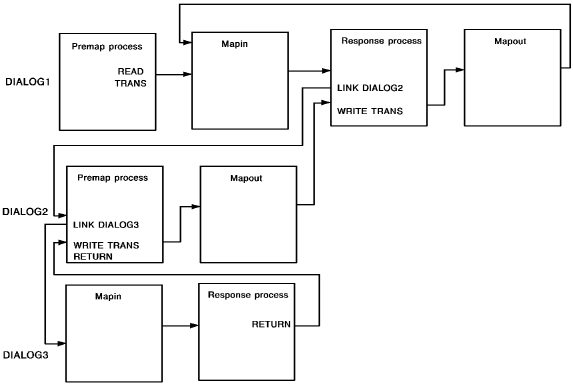
Note: Because the WRITE TRANSACTION command passes control to another part of the application, and because the command does not write to both the suspense file and the output file at the same time, it is difficult to write to both files if that is what you want. An alternative is to associate the output file map with a second dialog. The first dialog links to the second, which issues a WRITE TRANSACTION RETURN command. The command writes a record to the output file and returns to the first dialog. The first dialog then issues a WRITE TRANSACTION command that writes the input record to the suspense file.
Control Command Example
Control commands, including READ and WRITE TRANSACTION commands, the READ TRANSACTION and WRITE TRANSACTION commands, affect runtime flow of control. A few of these commands are illustrated below.
Accessing Multiple Input and Output Files
Control commands enable a batch application to consist of multiple dialogs. Through multiple dialogs, an application can access multiple input and output files, as shown below.
Application Execution
Application execution is described below:
For detailed information on the flow of control in a mapin operation, see Runtime Flow of Control.
|
Copyright © 2013 CA.
All rights reserved.
|
|