

Input and Output Files
Input files are sequential files from which batch transactions are read. Output files are sequential files to which batch transactions are written. CA ADS Batch provides access to sequential files, such as disk, tape, card, and printer, and to VSAM entry-sequenced data sets (ESDS) that are accessed sequentially. Records in input and output files (that is, file records) can be any type except variable spanned.
Note: CA ADS Batch does not support user and nonstandard tape labels. On input, tape labels are bypassed; on output, they cannot be written.
Describing Files
You describe files, consisting of file, record, and element entities, in the data dictionary using the IDD DDDL compiler.
Note: For more information about describing file, record, and element entities, see the CA IDMS IDD DDDL Reference Guide. For more information about specifying file characteristics, see Runtime Considerations.
File Maps
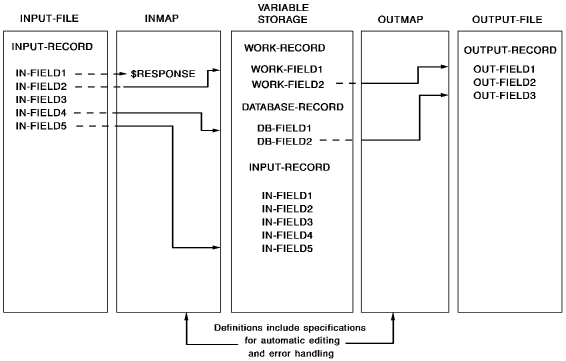
A file map is defined for each file record type in an application. File maps are used at runtime to transfer data between file record elements and data fields in variable storage. The diagram below shows two file map definitions.
Mapin Operation
An input file map, such as INMAP in the above diagram, transfers data from fields in an input file record to data fields in variable storage. Reading a file record using a map is called a mapin operation.
Mapout Operation
An output file map, such as OUTMAP, transfers data from data fields in variable storage to fields in an output file record. Writing a file record using a map is called a mapout operation.
Components of a File Map
A file map consists of one external record and zero or more internal records, as follows:
Fields Mapping to Themselves
Fields can map to themselves. For example, in the diagram, IN-FIELD5 maps to itself. On a mapin operation at runtime, IN-FIELD5 in the input buffer is moved into IN-FIELD5 in variable storage. Automatic editing and error handling can be performed on the field; the length of the field, however, cannot be changed.
Note: If a field maps to itself, the entire record is available for access and update as an internal record in variable storage; however, only those fields included in the map definition are mapped into or out of variable storage. In the example, INPUT-RECORD is available in variable storage because IN-FIELD5 maps to itself. On a mapin operation, however, data is moved only to IN-FIELD5 of INPUT-RECORD; nothing is moved to the other fields of the record.
Internal Record Fields
Map process commands refer to internal record fields. For example, a process module whose dialog is associated with INMAP could issue commands such as the following:
IF FIELD WORK-FIELD1 IS IN ERROR...
MODIFY MAP FOR FIELD DB-FIELD1 EDIT IS ERROR.
A map process command could also reference IN-FIELD5, but could not reference any of the other fields in INPUT-RECORD.
Input and Output File Maps
File maps can be used for both input and output. You specify that a file map is for input or output during dialog definition when you associate the map with a dialog. A map can be the input file map for one dialog and the output file map for another dialog. A map can be the input and the output file map for the same dialog. In the diagram, INMAP could be associated with a dialog as an output file map, and vice versa for OUTMAP.
Accessing Different Data Sets
The same map can access different data sets. You associate input and output file maps with data sets on a dialog-by-dialog basis. In this way, a single file map can be used to access several data sets in an application.
For example, in an application that copies one data set to another, only one file map is necessary. The map is the input file map for one dialog, and in that capacity, is associated with the input data set. The same map is the output file map for the same or another dialog, and in that capacity, is associated with the output data set.
Automatic Editing and Error Handling
Automatic editing and error handling specifications can be part of the map definition. For example, a field can be converted from a DISPLAY field to a COMPUTATIONAL field. Edit and code tables can be used to check fields for valid values and to convert fields from one value to another.
Response Fields
A response field can be included in the definition of a file map. You specify that a field is a response field by associating it with $RESPONSE during map definition. In the example, IN-FIELD1 is a response field. On a mapin operation at runtime, the value of the response field can determine the next dialog response process or application function that is executed, just as in the online environment.
An output file map can also include a response field. On a mapout operation, the value of the $RESPONSE system-supplied data field is mapped out to external record fields as appropriate.
A response field can be a single field or the concatenation of several fields in a file record. When two or more fields are used to form the response field, you specify the sequence in which the fields are concatenated. For example, a record consisting of fields A through F can have a response field made up of the concatenation of fields D, B, and F, in that order. The maximum length of the concatenated response field is 32 bytes.
Fields that compose a response field must have a usage of DISPLAY. Note that response fields used in applications defined with the application compiler can have a maximum length of eight bytes.
Excluded Fields
Fields can be excluded from a map definition. For example, in the diagram, IN-FIELD3 is not included in the definition for INMAP, and OUT-FIELD2 is not included in the definition for OUTMAP. On a mapin operation, data in excluded fields is not mapped into variable storage.
On a mapout operation, the excluded fields are initialized according to the following rules:
Note: Note that since the output buffer is initialized, you can have an external record with FILLER fields.
For more information about mapping in and mapping out, see Batch Dialog Structure and Application Structure.
|
Copyright © 2013 CA.
All rights reserved.
|
|