

Application Concepts › The Flow of Control
The Flow of Control
The following figure presents the way in which the flow of control is directed within an application:
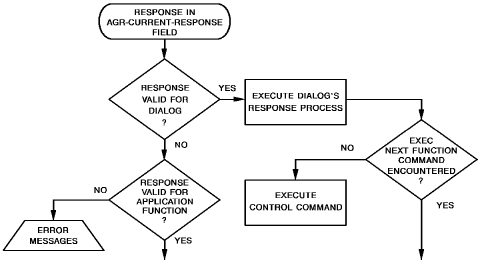
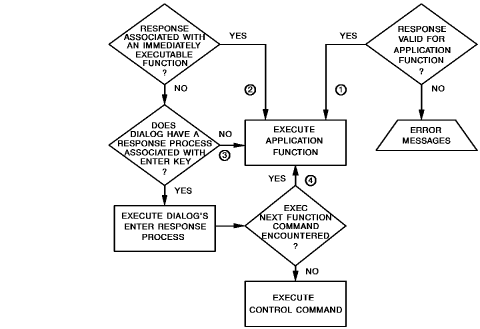
The numerals in the flowchart, above, refer to the four sets of circumstances that determine when the next function will be executed, as discussed in the text.
When the user selects a valid response, the function associated with that response is established as the next function to be executed. This function is not executed until the runtime system satisfies certain criteria. The flowchart illustrates the circumstances that determine when the next function will be executed, as follows:
- If the response is known to the dialog, the runtime system immediately executes the response process of the dialog. If an EXECUTE NEXT FUNCTION command is encountered and the response is valid for the application function, the function associated with the application response is executed next. If there is no EXECUTE NEXT FUNCTION command, the dialog passes control with an INVOKE, TRANSFER, RETURN, LINK, or DISPLAY control command.
If the response is not valid for the application function, the following error message is displayed when an EXECUTE NEXT FUNCTION command is encountered: PLEASE SELECT NEXT FUNCTION
- If the response is valid for the function, the system checks to see if the response is associated with one of the following ADSA system functions:
- HELP
- SIGNON/SIGNOFF
- FORWARD/BACKWARD (menus only)
If so, the system function is executed immediately.
If the response is not valid for the dialog, the CA ADS runtime system determines if the response is known to the application. If not, the following error message is displayed:
UNACCEPTABLE RESPONSE. PLEASE TRY AGAIN.
- If the response is valid for the application function, but not known to the dialog, and if the response is not an immediately executable ADSA system function, the runtime system checks to see if there is a response process associated with the ENTER key. If there is no such associated response process, the application function is executed immediately.
- If the status of the response is the same as in situation #3 (that is, valid for the application, not known to the dialog, and not an immediately executable function) and a response process is associated with the ENTER key, the ENTER response process is executed first and the application function is executed when an EXECUTE NEXT FUNCTION is encountered. If there is no EXECUTE NEXT FUNCTION command, the dialog passes control with an INVOKE, LINK, TRANSFER, RETURN, or DISPLAY command, as in the first example.
Copyright © 2013 CA.
All rights reserved.
|
|