

Designing Dialogs › Design Considerations › Global Records › Selected Fields
Selected Fields
Selected fields from the .hw ADSO--APPLICATION--GLOBAl--RECORD are listed below.
- The AGR-NEXT-FUNCTION field contains the name of the next function that is to be executed. When the dialog associated with the current function ends with an EXECUTE NEXT FUNCTION command, the function named in the AGR-NEXT-FUNCTION field is executed by the runtime system. A dialog or user program can query this field to check what the next function will be. Modification of the AGR-NEXT-FUNCTION field, however, does not change the next function to be executed; a change in the next function can only be accomplished by modification of the AGR-CURRENT-RESPONSE field (see below).
- The AGR-DEFAULT-RESPONSE field contains the default response value specified on the Function Definition screen when an application is generated. When a value is specified and the screen includes a data field for a default response, the user can type in a new value or can space out the value that appears.
- The AGR-CURRENT-RESPONSE field contains the response specified by the user. The process code of a dialog or user program can also move values into this field, overwriting the user response. Note that, if .hw AGR--CURRENT--RESPONSE is modified by a dialog, security is not checked for the response moving into the field, even if security is associated with this response.
- When EXECUTE NEXT FUNCTION is encountered within process code, the response named in the AGR-CURRENT-RESPONSE field is executed if it is a valid response for the current function. The AGR-CURRENT-RESPONSE field determines the next function in the application thread (that is, it determines the value moved into the AGR-NEXT-FUNCTION field).
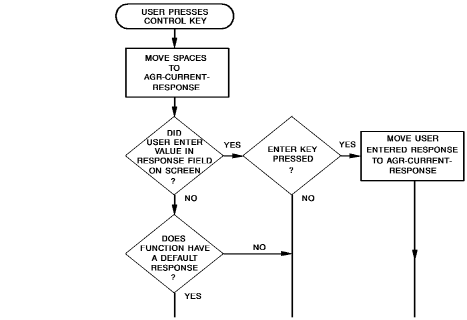
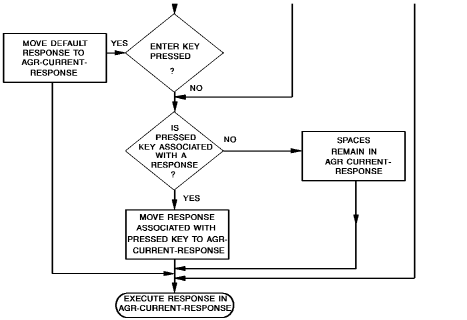
- The value in AGR-CURRENT-RESPONSE depends upon whether the AGR-DEFAULT-RESPONSE field contains a value; whether the user enters a new value in the response field; or whether there is a response value associated with the control key (other than ENTER) pressed by the user.
- The following flowchart illustrates how the CA ADS runtime system places a value in the AGR-CURRENT-RESPONSE field of the .hw ADSO--APPLICATION--GLOBAL--RECORD. The runtime system executes the response named in the AGR-CURRENT-RESPONSE field after determining that it is a valid response for the current function.
- The AGR-EXIT-DIALOG field initially contains the name of the exit dialog specified on the Application Definition screen. This field can be used to link to a special routine.
- For example, one department of a company might want the employee name specified as John Doe, while another department wants the name specified as Doe, John. The same dialog could be used for both departments by linking to an exit dialog (that is, LINK TO AGR-EXIT-DIALOG) containing a name routine.
- The AGR-PRINT-DESTINATION field initially contains the default name of the printer for the application as specified on the ADSA Application Definition screen. Dialogs and user programs can use this print destination with the WRITE PRINTER DESTINATION command.
- The AGR-USER-ID field can be queried by dialogs and user programs.
- The AGR-PRINT-CLASS field initially contains the default printer class for the application as specified on the ADSA Application Definition screen. The dialog can reference this field with the WRITE PRINTER CLASS command.
- The AGR-SIGNON-SWITCH field can be queried to determine if there has been a valid signon.
- The AGR-SIGNON-REQMTS field indicates whether signon is optional, required, or not used for the signon menu, as specified on the Security screen. This field can be referenced for additional security checking.
- The AGR-MAP-RESPONSE field can be used as a response field, in place of the $RESPONSE field, in any user-defined nonmenu map. The dialog can initialize this response field before mapout so that the desired default response appears on the map. For input purposes, the AGR-MAP-RESPONSE field works in the same manner as the $RESPONSE field.
- For further information on the $RESPONSE field, refer to CA IDMS Mapping Facility Guide
- The AGR-MODE field initially contains the value STEP or FAST as specified on the Application Definition screen. Typically, the design of a dialog map includes a field that displays the value of AGR-MODE. The user can change this field at any time.
Copyright © 2013 CA.
All rights reserved.
|
|