

DBCS options enable the conversion of multi-byte character data exchanged by CA IDMS Server and the CA IDMS system. Under ASCII-EBCDIC Conversion, select the DBCS option.
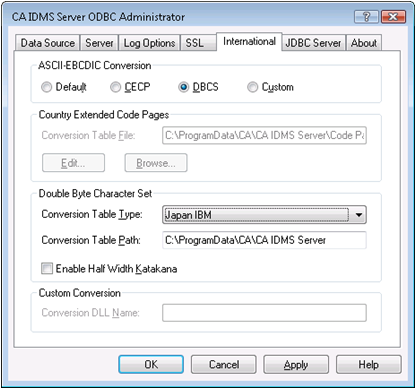
Under Double Byte Character Set, set the following options:
Allows you to select the types of DBCS used by your CA IDMS system from a drop down menu.
Specifies the path of the subdirectory containing the DBCS conversion tables. Typically, the default is accepted.
Enables half width Katakana support when DBCS is enabled when this box is checked. All lowercase characters in CHAR and VARCHAR data are treated as half width Katakana. This does not affect GRAPHIC, VARGRAPHIC, and mixed data within SO and SI in CHAR and VARCHAR types. Only uppercase Roman text can be transferred between the mainframe and the PC when this option is enabled.
|
Copyright © 2009 CA.
All rights reserved.
|
|