

When adding a new data source, you must specify the type of data source, and include the name of the dictionary where the SQL tables are defined as well as the node name of the CV containing the dictionary. Use the ODBC Data Source Administrator to begin the process of adding a new data source.
To access the ODBC Data Source Administrator, select Start, Programs, CA, CA IDMS Server, ODBC Administrator. Note that on 64-bit Windows, there might be shortcuts to both 32-bit and 64-bit versions of the ODBC Administrator.
The ODBC Data Source Administrator dialog lists the names of each defined data source, followed by the database driver in parentheses. If no Data Source Name (DSN) is listed, click the User DSN or System DSN tab and click Add to invoke the Create New Data Source dialog.
The Create New Data Source dialog lists all installed drivers. Select CA-IDMS and click Finish. The CA IDMS Server ODBC Administrator dialog appears:
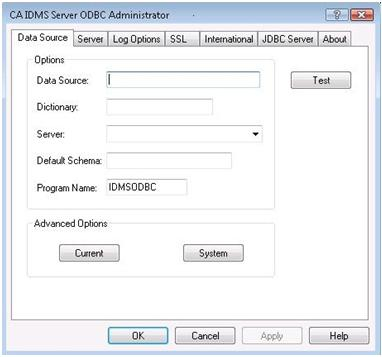
The Data Source tab of the CA IDMS Server ODBC Administrator dialog lets you define a new data source or modify the dictionary or server of an existing data source. You must supply the following essential information to define a new data source or modify.
|
Copyright © 2009 CA.
All rights reserved.
|
|