

You can set the Explorer View tree to display versions from a package perspective. When you do this, the tree automatically reorganizes to display the package’s branch versions in folders. Expanding these branch versions reveals other related versions. This feature is particularly useful if you want to view new items or folders created on a branch.
You show a package-centric Explorer View by selecting a package from the Package drop-down list at the top of the Explorer View. When you select a package, the working view root node updates to reflect the package's versions. If you select a package and create a path on a branch using the package, the new path version immediately appears in the Explorer View tree. If you do not select a package, the Explorer View works in the usual trunk-oriented way.
Follow these steps:
The Package field is enabled.
The Explorer View tree is reorganized to show the package’s branch versions in folders. This includes new items or folders created on a branch.
Other related versions are displayed.
Example: Show a Package-Centric Explorer View
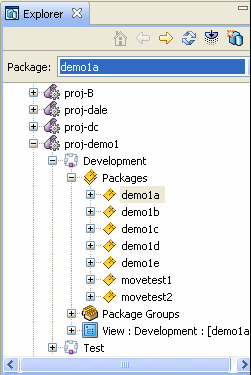
This example shows a package named demo1a in a package-centric view.
The Package field is enabled.
The Explorer View tree displays the View root as Development : [demo1a] as shown in the following illustration:
|
Copyright © 2015 CA Technologies.
All rights reserved.
|
|