

The interactive merge process lets you do the following:
Binary files cannot be used with the interactive merge process. When this process executes, it first checks that the file consists entirely of printable characters (or control characters such as tab, carriage return, and line feed). If any area of the file contains binary data, the merge process does not execute and an error message displays.
The interactive merge process lets you perform a two-way or three-way merge:
Note: If you want to check in a branch version and do not need to look at the differences between versions, make sure that it is the correct version, and click OK.
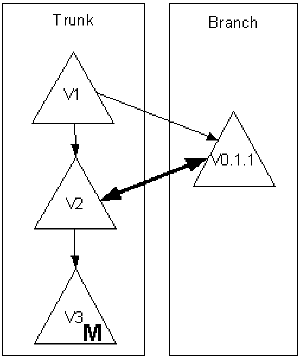
The following diagram shows a two-way merge process. The bold bi-directional arrow shows the comparison between the branch and trunk versions.
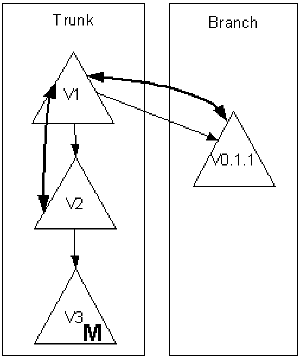
The following diagram shows a three-way merge process. The curved arrow shows the comparison between the branch and trunk versions, and the comparison between the common ancestor and the trunk and branch versions.
|
Copyright © 2013 CA.
All rights reserved.
|
|