

A version on a branch becomes part of the project trunk through the concurrent merge process. Until you execute this process, changes made on the branch exist only on the branch. After all items have been checked in to a branch, invoking the concurrent merge process for the package containing the changes causes the versions on the branch to be combined in a single version on the trunk. The new version created on the trunk is the latest in the view.
If more recent versions exist on the trunk than the version from which the branch was created, the version created by the concurrent merge is tagged as merged (M). If the version from which the branch was created is the latest version of the item on the trunk, the version created on the trunk by the concurrent merge has no tag.
Important! CA Harvest SCM does not support concurrent development of item paths; the concurrent merge process cannot create item path versions with the merged tag.
In the following diagram, the branch version 1.1.2 is concurrently merged with the project trunk. The version created by the concurrent merge becomes the latest on the view's trunk, version 3, and is tagged as merged.
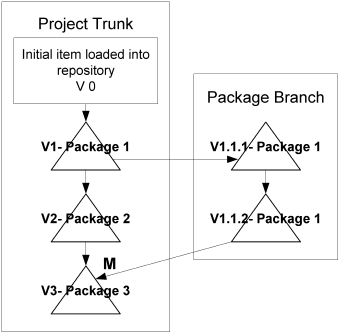
In the preceding diagram, if version 2 did not exist on the project trunk, the concurrent merge process would have created a non-tagged version 2. Merged tags appear only when changes have been made on the trunk that could conflict with changes made on the branch. If version 1 is the latest version when the merge executes, no changes exist on the trunk to conflict with the branch versions, so a merged tag is unnecessary.
The merge-tagged version of an item must be resolved through the interactive merge process before another version of the same item can be concurrently merged to the project trunk. The check-out for update and cross project merge processes also cannot be successfully executed on an item for which a merge-tagged version exists; and packages which contain merge-tagged versions cannot be promoted or demoted to a state in a different view.
|
Copyright © 2013 CA.
All rights reserved.
|
|