

The hsync command updates a file system directory (reference directory) so it reflects the contents of a CA Harvest SCM view path. The hsync command checks out the latest versions of items in the CA Harvest SCM view and deletes files in the reference directory that no longer belong.
CA Harvest SCM supports full view and active view approaches. The inventory of items that is checked out to each reference directory depends which approach you use. The approaches are described in the following sections.
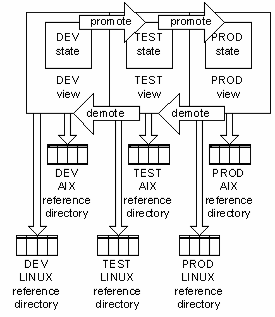
The following scenario illustrates the basic process of refreshing reference directories. The diagram shows a CA Harvest SCM lifecycle with three states and their corresponding working views: DEV, TEST, and PROD. Promote and demote processes move packages from one state to the next state. Reference directories external to CA Harvest SCM keep copies of the files that CA Harvest SCM manages. You can have a single reference directory for each view, or multiple reference directories associated with each view. You can use multiple reference directories on different operating systems that support different build targets as shown in the diagram.
|
Copyright © 2013 CA.
All rights reserved.
|
|