

The following is a sample AuditCard with the right-click menu open. (Creating and managing AuditCards is described in chapter 9). The displayed options may vary slightly depending on the highlighted AuditCard record.
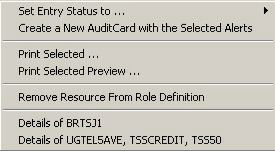
The following right-click controls enable editing AuditCard records and printing selected records:
|
Name |
Menu Bar Location |
Shortcut |
Description in Section |
|
Set Entry Status To |
- |
- |
|
|
Create a New AuditCard with the Selected Alerts |
- |
- |
|
|
Print Selected |
- |
- |
|
|
Print Selected Preview |
- |
- |
|
Copyright © 2013 CA.
All rights reserved.
|
|