

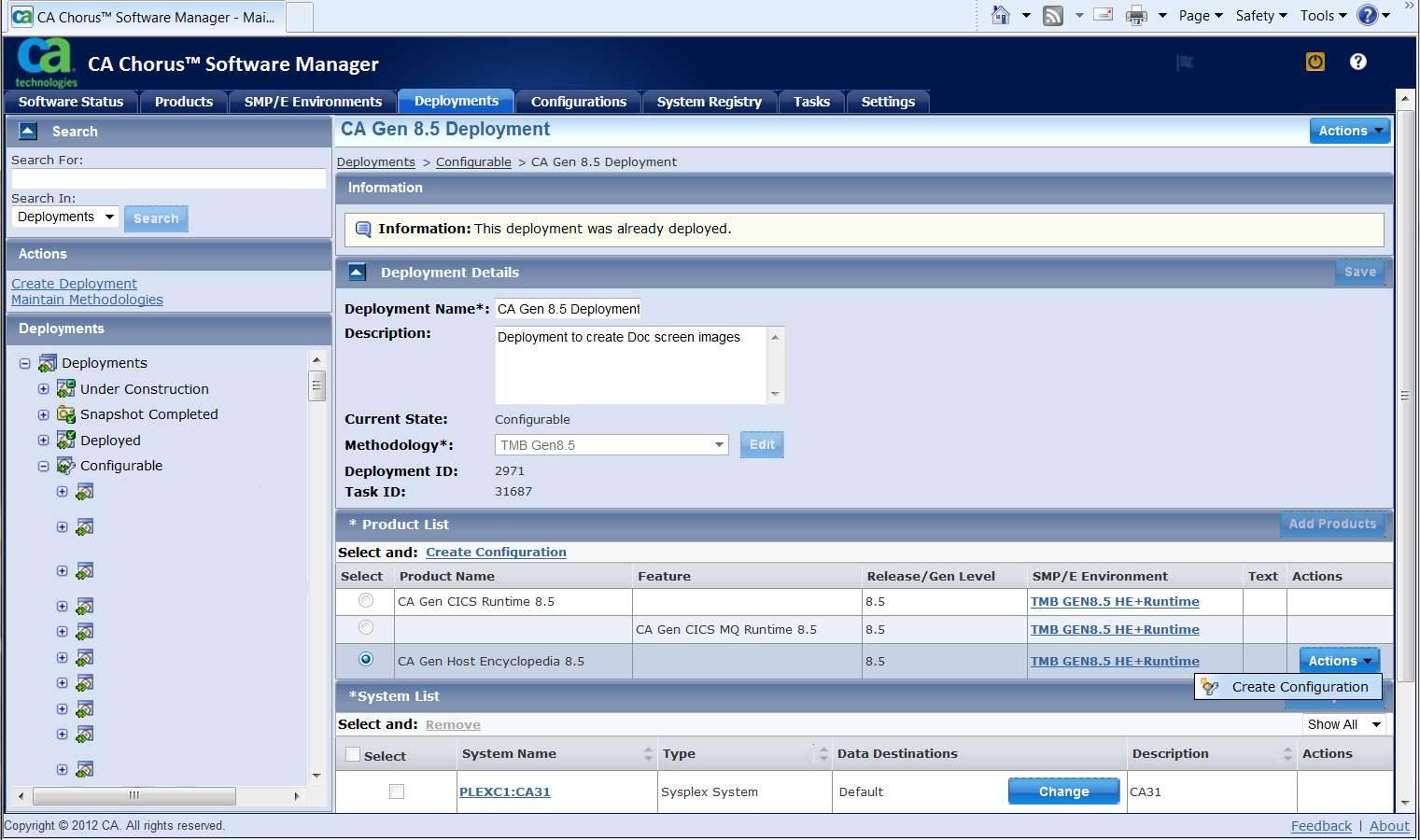
After the CA Gen Host Encyclopedia has been deployed it is Configurable. Select Create Configuration to start the wizard. The CA Gen Runtime (CICS or IMS) is not configurable at this time, and it does not need to be selected for the Runtime DLLs library to be included in the Host Encyclopedia Configuration.
Perform the steps in the configuration wizard to define and build the configuration.
Follow these steps:
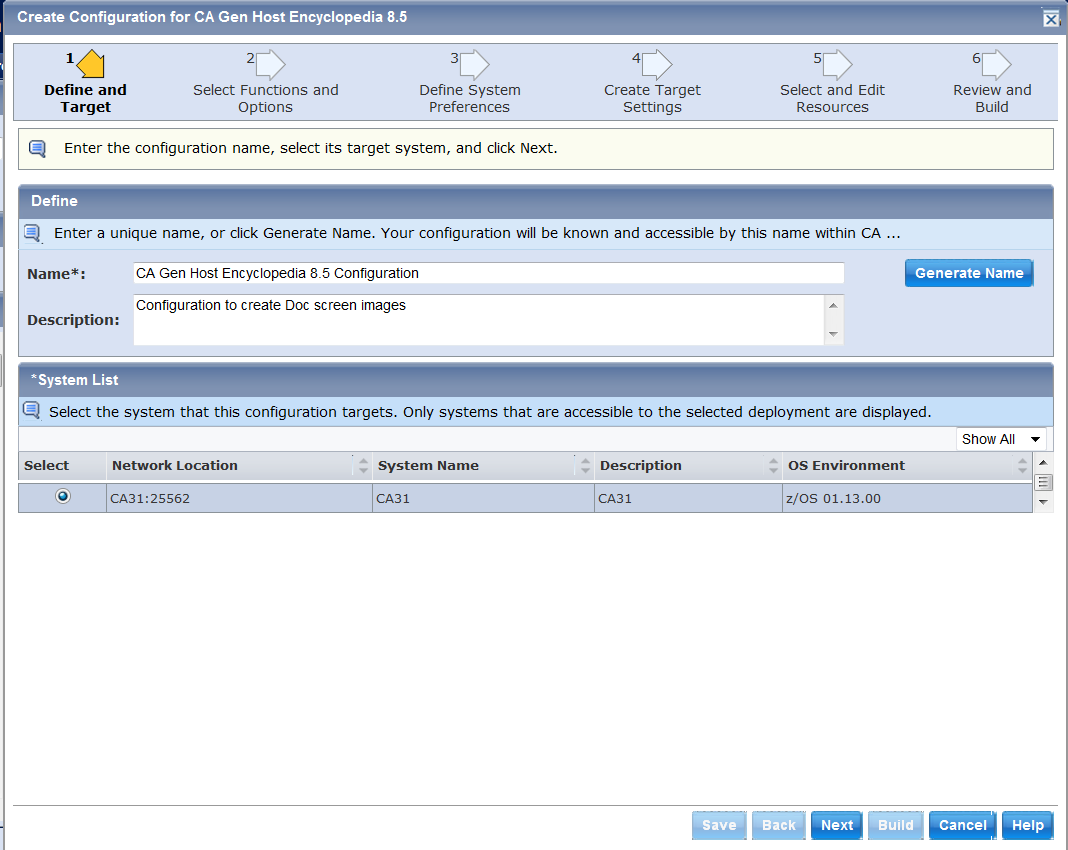
Select your CA Gen deployment from the list of configurable deployments and create a configuration. The configuration must target an available system.
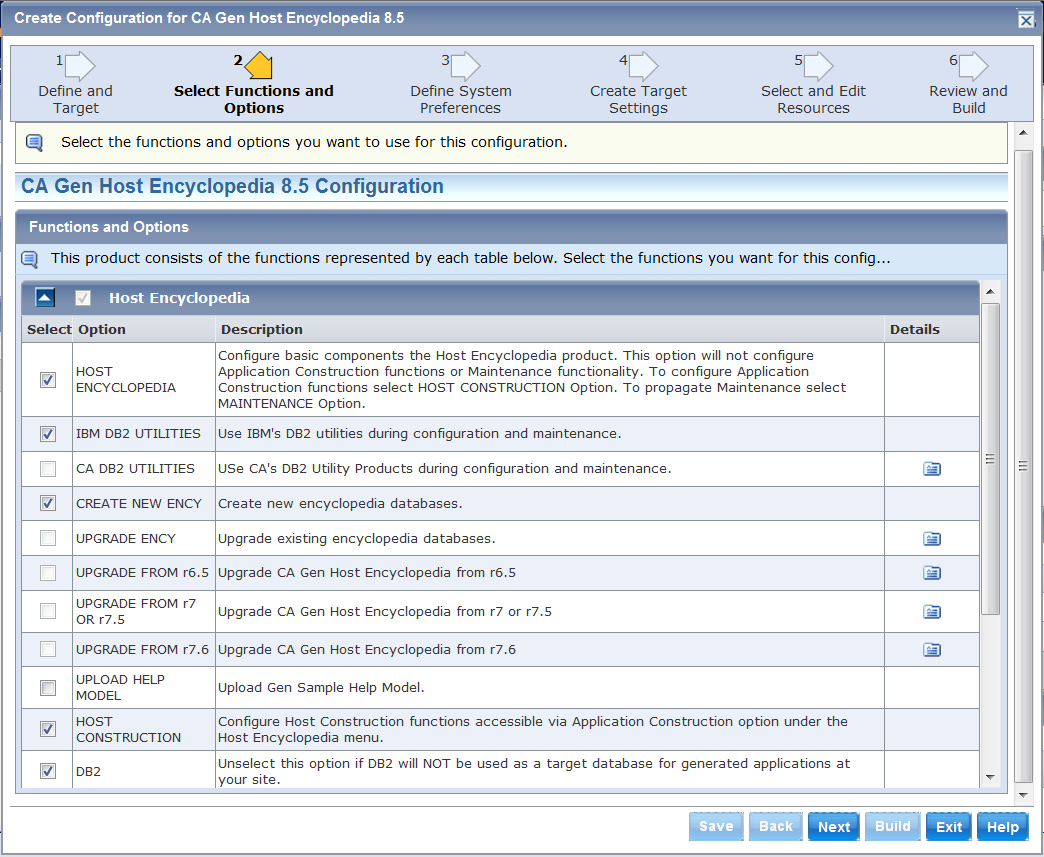
Select CA Gen Host Encyclopedia functions and options for configuration. The options selected here are used to determine the variables presented in the Create Target Settings dialog to obtain values used in the Implementation. This is akin to the CEINSTAL process used when Configuring the Host Encyclopedia without CSM. In the following example, a New Encyclopedia will be created using IBM’s DB2 utilities, Host Construction is selected and a DB2 profile table will be used for applications built by the Encyclopedia.
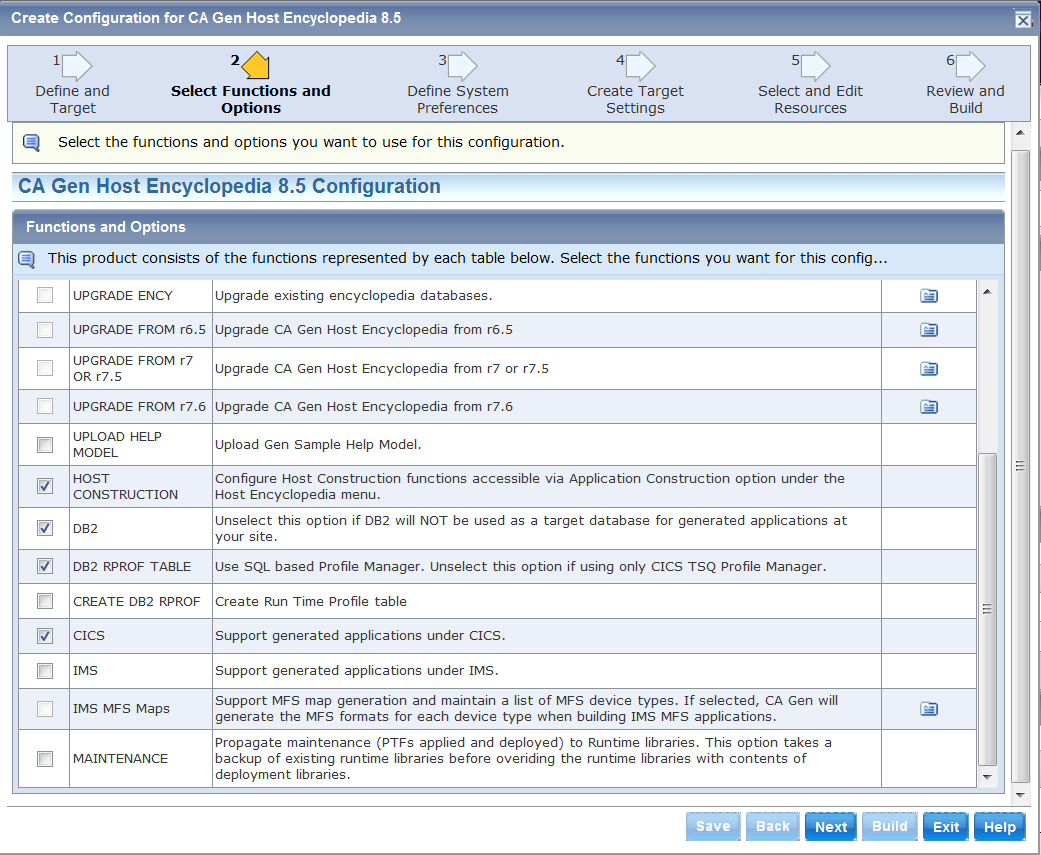
CA Gen Host Construction components can be configured if the Host Construction option is selected, but CICS or IMS runtimes must be already deployed (selected when the deployment was created) to enable them to be included in this configuration.
The MAINTENANCE option cannot be used when Creating a New Encyclopedia or Upgrading an Existing Encyclopedia. It is intended to propagate already installed and deployed PTFs to Runtime datasets used by an existing Host Encyclopedia and Host Construction.
The following table lists the configuration options for the Host Encyclopedia and Host Construction:
|
Configuration Option ID |
Description |
|---|---|
|
HOST ENCYCLOPEDIA |
Configures basic components in the Host Encyclopedia product. This option does not configure Application Construction functions. |
|
IBM DB2 UTILITIES |
Use IBM DB2 utilities during configuration. |
|
CA DB2 UTILITIES |
Use CA Technologies DB2 Utility Products during configuration. |
|
CREATE NEW ENCY |
Create encyclopedia databases. |
|
UPGRADE ENCY |
Upgrade existing encyclopedia databases, select version from the options that follow. |
|
UPLOAD HELP MODEL |
Upload CA Gen Sample Help Model. |
|
HOST CONSTRUCTION |
Configure Host Construction Functions accessible through Application Construction option under the Host Encyclopedia menu. |
|
DB2 |
Unselect this option if DB2 is NOT used as a target database for generated applications. |
|
DB2 RPROF TABLE |
Use SQL-based Profile Manager. Selecting this option will enable the use of DB2 RPROF in addition to the CICS TSQ RPROF. Unselect this option if using ONLY the CICS TSQ Profile Manager. |
|
CREATE DB2 RPROF |
Create Runtime Profile table. Unselect this to use a DB2 RPROF table previously created (even if created for earlier releases). |
|
CICS |
Support generated applications under CICS. |
|
IMS |
Support generated applications under IMS. |
|
IMS MFS Maps |
Support MFS map generation and maintain a list of MFS device types. If this option is selected, CA Gen generates the MFS formats for each device type when building IMS MFS applications. |
|
MAINTENANCE |
Propagate maintenance (PTFs applied and deployed) to Runtime libraries. This option takes a backup of existing runtime libraries before overriding these runtime libraries with the contents of the deployment libraries. |
In the following example, the CICS region CGDCICS2 is selected as the designated environment for CA Gen applications targeting CICS.
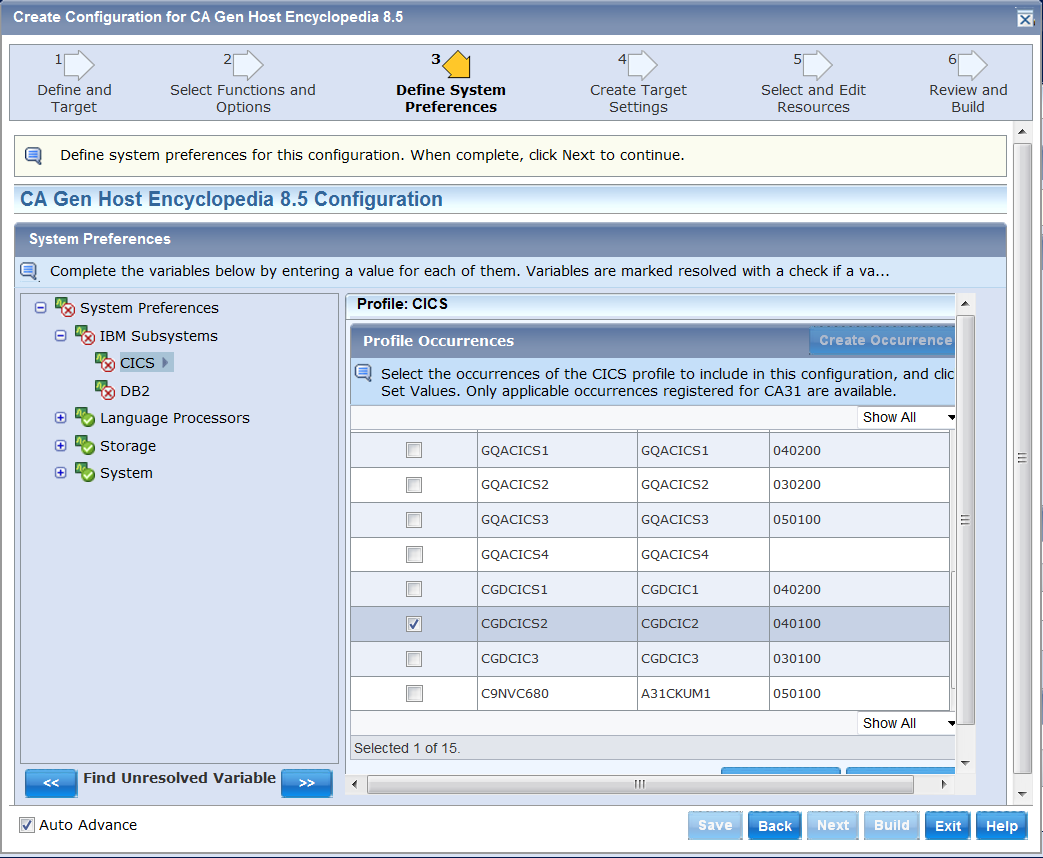
Note: The configuration options Host Construction and CICS must have been selected in the Select Functions and Options panel for the CICS subsystems occurrences to be presented.
The significant environment variables for CA Gen are as follows:
Specifies the z/OS version identifier of the system. Enter a 6 digit numeric value in the form vvrrmm. The vv is version, rr is release, and mm is the maintenance level. For example, 011100 for z/OS 1.11.
Specifies the DB2 subsystem name. Enter a 1 to 4 character uppercase alphanumeric or national (#,@,$) text string that must begin with an alphabetic or national character.
Specifies a DB2 load module library. Enter a 1 to 44 character MVS data set name.
Specifies the DB2 load module library containing the subsystem parameter module (DSNHDECP) and user-written exit routines. Enter a 1 to 44 character MVS data set name. This is a mandatory field. The name can be the same name provided for SDSNLOAD, in which case the SDSNLOAD dataset will be included twice in the STEPLIB DD but this will NOT be a problem.
Specifies the DB2 product version identifier. Enter a 6 digit numeric value in the form vvrrmm. The vv is version, rr is release, and mm is the maintenance level. For example, 100100 for DB2 10.1.00.
Specifies the DB2 product version identifier. Enter a 3 character value in the form Vnn. The nn is version. For example, V10.
Specifies the C/C non-XPLINK (uppercase, no long name) resident routine library. Enter a 1 to 44 character MVS data set name.
Default: CEE.SCEELKED
Specifies the MVS Language Environment (LE) dynamic runtime library. Enter a 1 to 44 character MVS data set name.
Default: CEE.SCEERUN
Specifies whether the MVS Language Environment (LE) dynamic runtime libraries SCEERUN and SCEERUN2 are in the LNKLST/LPALST. Select YES or NO.
Specifies the COBOL compiler name. Enter a 1 to 8 character load module name.
Specifies a COBOL compiler load module library. Enter a 1 to 44 character MVS data set name.
Specifies whether the libraries needed for the COBOL compiler are in LNKLST/LPALST. Select YES or NO.
Specifies the runtime library associated with the CICS region. Enter a 1 to 44 character MVS data set name.
Specifies the name of the CICS region. Enter a 1 to 8 character uppercase alphanumeric or national (#,@,$) text string that must begin with an alphabetic or national character.
Specifies the primary VTAM APPLID of the CICS region. Enter a 1 to 8 character uppercase alphanumeric text string.
Default: DBDCCICS
Specifies the Transaction Service version identifier of the CICS region. Enter a 6 digit numeric value in the form vvrrmm. The vv is version, rr is release, and mm is the maintenance level. For example, 030200 for CICS TS 3.2.
Specifies the IMS linkage editor library. Enter a 1 to 44 character MVS data set name.
Specifies the name of the IMS system. Enter a 1 to 8 character uppercase alphanumeric or national (#,@,$) text string that must begin with an alphabetic or national character.
Specifies the IMS product version identifier. Enter a 6 digit numeric value in the form vvrrmm. The vv is version, rr is release, and mm is the maintenance level. For example, 110100 for IMS 11.1.
Define your CA Gen Host Encyclopedia and Host Construction target environment by specifying values for CA Gen product variables.
Host Encyclopedia variables are grouped to match the CEINSTAL process. Expand each group to see the individual variables. Some variables have default settings that can be overwritten or confirmed as seen, and accepted. The option ‘Find Unresolved Variable’ sequentially displays the mandatory variables and variables which require confirmation. The icon  means the variable has been resolved (has a value, either entered or confirmed). The icon
  means the variable needs to be resolved (either requires a value or needs to be confirmed). The same icons apply to the product variable groups, in which case one or more variables in the group needs to be actioned. The Next button only becomes active when all the variables have been resolved.
A previous configuration can be used to populate the current configuration, re-using the same variable values if appropriate. This is particularly useful for the Maintenance option, where PTFs are being applied to an existing Configuration.
The following example shows the product variable groups for CA Gen Host Encyclopedia and Host Construction.
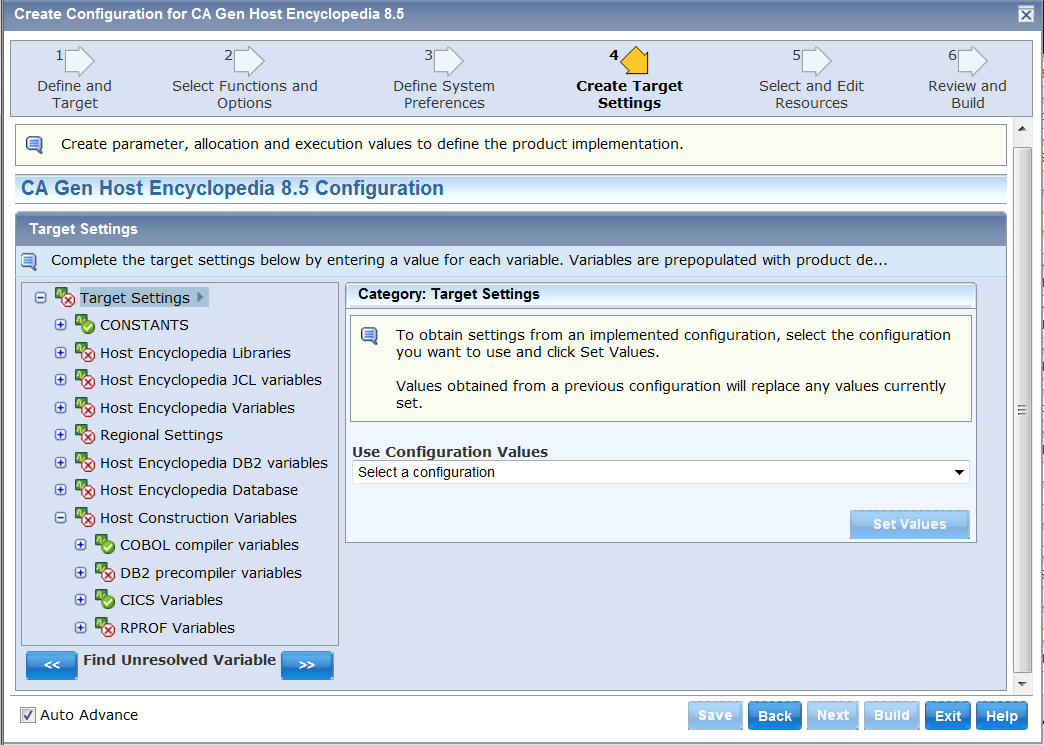
The product variables are grouped as follows:
Variables which are provided with constant values within the product.
CSMGEN is used as the second qualifier for temporary work datasets used to keep the output of Implementation Steps.
DSNTYPE determines the DSN Type used when allocating CA Gen partitioned datasets, like DBRM library. It is not used when allocating CA Gen Load Libraries like CEHBPLD0 or CEHBPLD1 as these are always allocated as PDSE (Library).
Prefix and suffixes for the libraries used by the Host Encyclopedia and Host Construction. Similar to the values entered using the CEINSTAL panel. These are the Runtime version of the Deployment datasets. The Runtime datasets includes the JCL, SQL, and PARMLIB datasets which are not part of Deployment.
Includes SMS variables used to allocate the Runtime datasets (permanent).
When Maintenance Option is used it requires an extra dataset prefix used to allocate datasets to backup the Runtime datasets prior to applying maintenance.
Variables used in Host Encyclopedia utility jobs, such as encyclopedia image copy.
Includes SMS variables used to allocate temporary datasets used to keep the output of Implementation Steps.
Global values used to operate the Host Encyclopedia, like encyclopedia name and plan prefix.
Includes SMS variables used to allocate userid prefixed datasets like <userid>.IEF.LOGFILE.
Optional variables used in model cross copy or conversion from another encyclopedia. This other encyclopedia is usually at a previous schema level.
DB2 environment variables used by the Host Encyclopedia such as the Secondary AuthID, database names, dynamic SQL plan name.
Variables used in creating the Host Encyclopedia DB2 databases and associated objects such as tables, indexes.
Storage Group for Host Encyclopedia database variables are used to distribute the encyclopedia spaces across different volumes. At this time the CSM Implementation only uses the odd numbered groups (1, 3 and 5), ignoring the others.
Target system specific variables.
Compiler variables are used to capture information about the COBOL compiler.
DB2 precompiler variables capture information about the DB2 precompiler. The information is used when precompiling a generated source module targeting DB2.
CICS variables are used to capture information about CICS. The information is used when installing generated applications targeting CICS. This option is activated by specifying support for generated applications under CICS in target environment configuration.
IMS variables capture information about IMS. The information is used when installing a generated application targeting IMS. This option is activated by specifying support for generated applications under IMS in target environment configuration.
RPROF variables capture information which is used to build the runtime profile manager for DB2. This option is activated by selecting DB2 RPROF TABLE option, made available by Host Construction. The option CREATE DB2 RPROF has no effect on this group.
In the following example, Host Encyclopedia Libraries is expanded. The default value for the variable ‘Runtime datasets prefix’ is shown. Confirm the default value or specify another value.
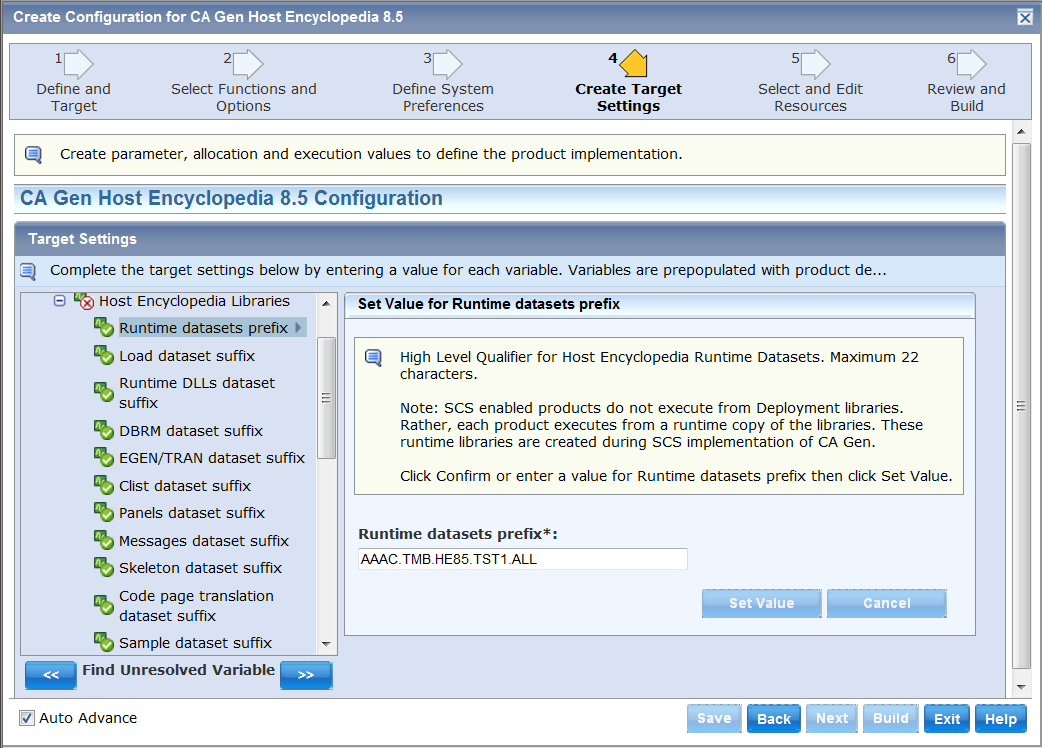
When Implemented, this specific Configuration creates datasets named AAAC.TMB.HE85.TST1.ALL.CEHBPLD0, CEHBCLS0 and so on and copies the contents of the Deployment datasets into them. In addition it creates datasets JCL, SQL and PARMLIB which are populated by the Implementation.
Once the Configuration is implemented the AAAC.TMB.HE85.TST1.ALL.* datasets are the Runtime datasets that should be accessed via the Logon Clist or Procedure to access this encyclopedia and construction.
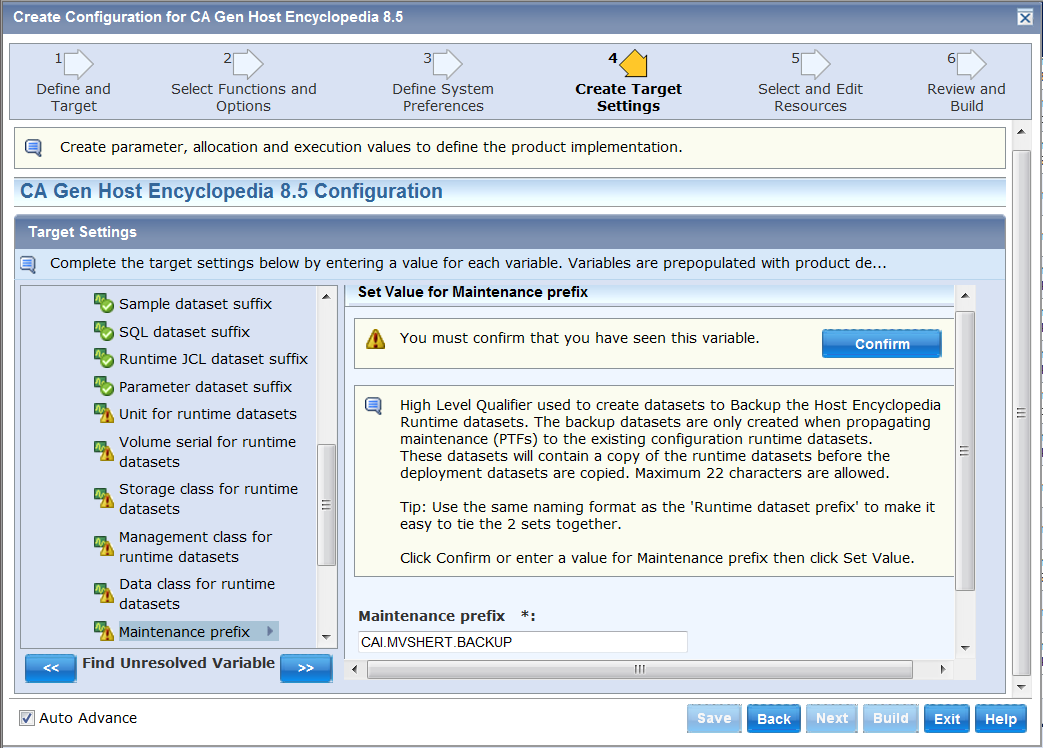
When Maintenance option is selected, the value specified for the ‘Runtime datasets prefix’ variable should be the value entered when this encyclopedia was originally created/upgraded. The ‘Maintenance prefix’ variable should be a different name as it will be used to create a backup of the Runtime datasets before the maintenance is propagated. Maintenance option requires that one of the DB2 utilities option (IBM or CA) is also selected.
Since Maintenance is intended to be applied to an existing configuration enter the name of a previously created configuration in the Use Configuration Values, or select one from the list, to pick up the values used when the Implemented Configuration was originally created.
Selecting the Upgrading Ency(clopedia) option enables the ‘Upgrade From ……’ options. CA CSM Configuration Services can be used to UPGRADE a CA Gen Host Encyclopedia created by a previous release of CA Gen (not just a CA CSM Configuration). Use CA CSM Installation and Deployment to create the Runtime version of the CA Gen 8.5 Host Encyclopedia software as before. Then in the Create Configuration dialog enter the database values (like Schema, Data and Public Interface database name) for the encyclopedia being upgraded. The Implementation will then configure your old encyclopedia to be used with the new software.
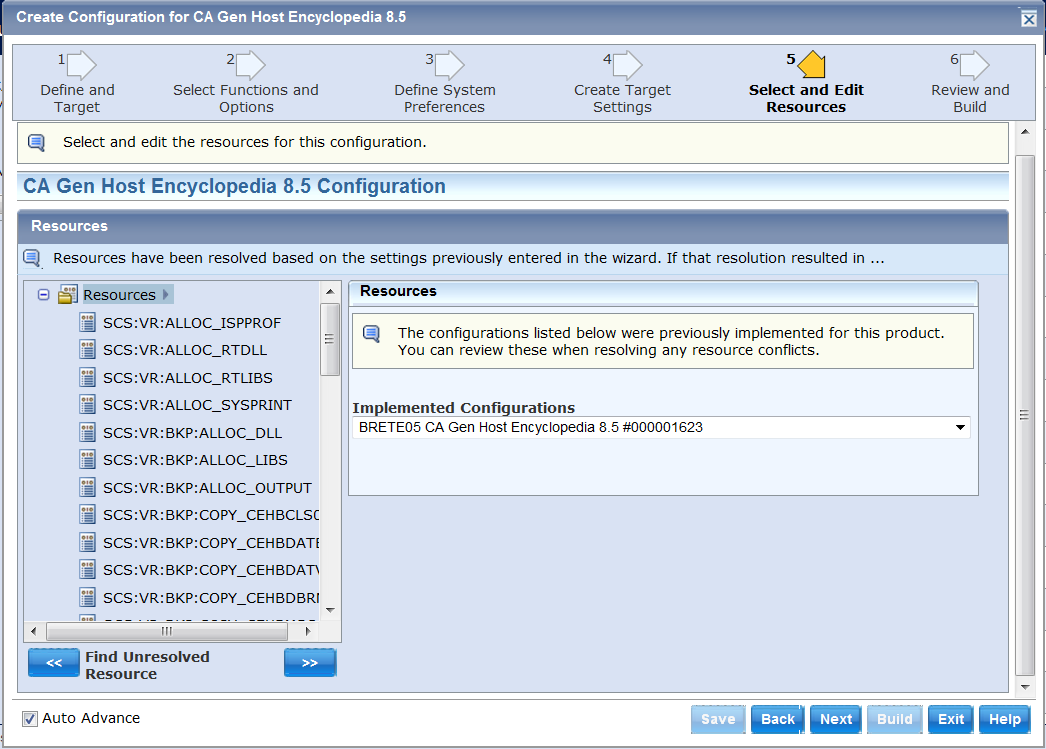
On this panel, you can select and edit resources.
There are no editable resources for Host Encyclopedia and Host Construction. Therefore you can proceed to the next step.
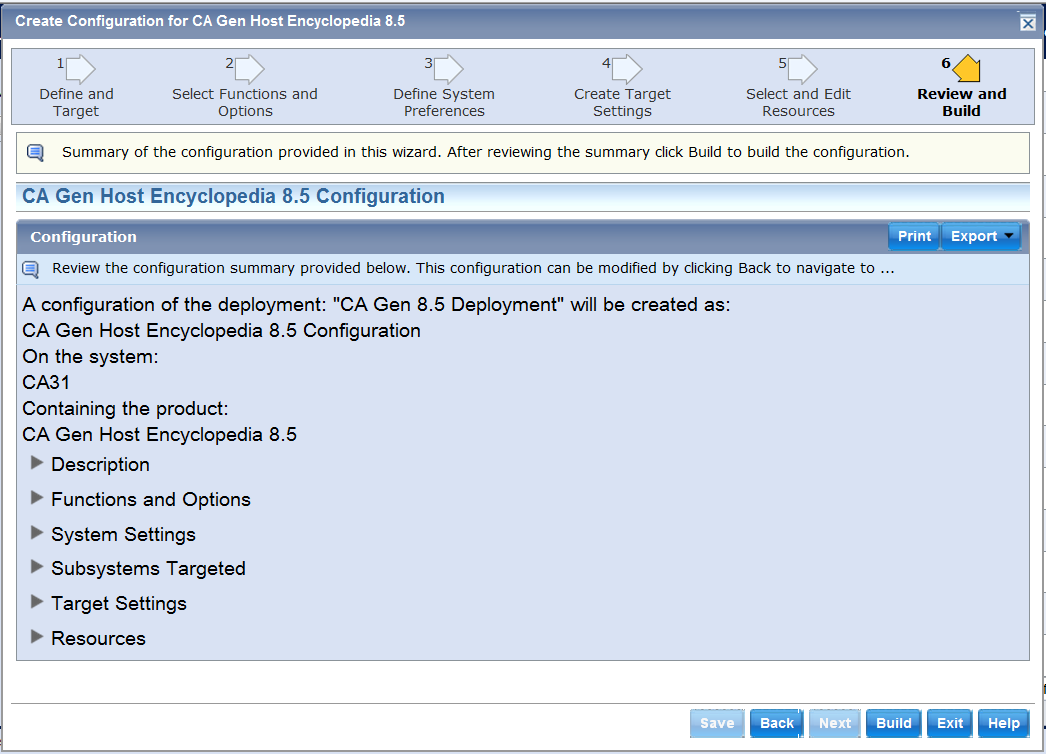
You can expand each section to see the value used by each variable. You can Print or Export (save) this Configuration Summary. Verify that the values entered or the ones presented by default are correct before selecting Build to Implement the configuration.
|
Copyright © 2015 CA Technologies.
All rights reserved.
|
|