

Starting Your Product › How to Configure Without CA CSM › Configuring Host Encyclopedia and Host Construction › Establish the Environment › Tasks to Define Installation Variables › Assign VSAM Names
Assign VSAM Names
Use this option to specify VSAM as the data storage type when setting the DB2 variables.
Follow these steps:
- Select option 8 on the Installation Variables Management Menu and press Enter.
The Assign VSAM names screen displays.
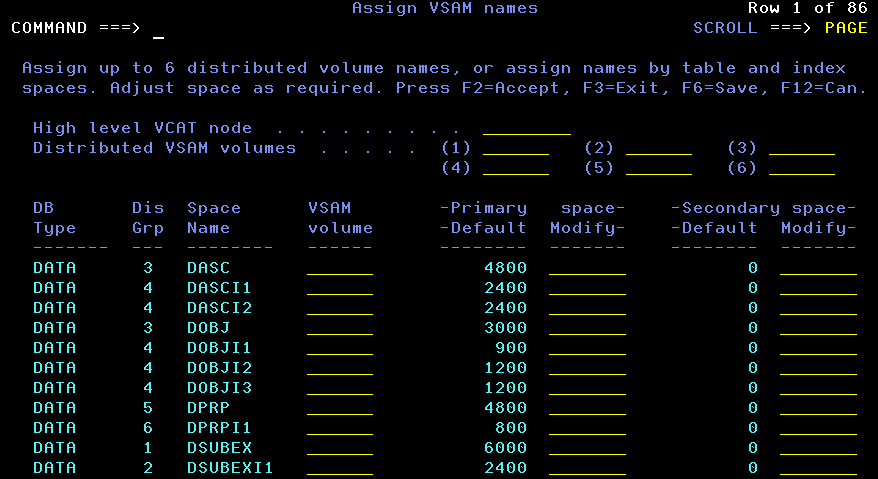
- Type the high-level VCAT node used to form the DB2 VSAM space data set names for the Host Encyclopedia.
- To distribute the tablespace and indexspace allocations across DASD volumes, type the names of the available volumes in spaces (1) through (6). Note that:
- You must specify at least one volume.
- Tablespaces and indices referencing a blank Distributed VSAM volume are distributed to (1).
- Allocating the database over three to six volumes can improve performance.
- If you specify more than one volume, you must complete all the Distributed VSAM volume fields. For example, if you only want to assign three volumes, complete all the fields by using the same volume name for (1) and (4), (2) and (5), (3) and (6).
- To specify how individual tablespaces and indices are distributed, modify the Dis Grp (Distribution Group) field. For more information about how CA Gen assigns high-use tablespaces and indexes, see Sizing an Encyclopedia.
- To modify a Primary Default storage value for a table or index, type a new value in the Modify Space column to the right of the Primary Default value.
- To modify a Secondary Default storage value, type a new value in the Modify Space column to the right of the Secondary Default value.
Note: To calculate the Secondary Default storage space value for a table or index, multiply the Primary Default storage space by the Secondary Storage Factor on the Set DB2 Variables screen.
- Press F2 to verify the entered variables and store them in the user's ISPF profile pool.
This also creates member TILTAB50 in the table library (TLIB). The systems uses TILTAB50 to create CEJOB02, the VSAM JCL space variables. For more information, see the section TILTAB50 in this guide.
- When verification is complete, press Enter to exit the Activity Display screen.
- Press F3 to exit the screen.
Copyright © 2015 CA Technologies.
All rights reserved.
|
|