

The Action Diagram View Display allows you to see the current import, export, local, or entity action views for an action diagram. The display shows the detailed information about the view and its predicates (attributes), including the current predicate values. The display also provides commands that let you expand repeating group views and modify predicate values.
The display is accessed from the Action Diagram Trace panel, using the DISPLAY vvvv command (vvvv = IMPORT, EXPORT, LOCAL, or ENTITY).
The following illustration shows a sample EXPORT view display.
PSCUSTOM Action Diagram EXPORT View Display
PSCUSTOM Action Diagram EXPORT View Display
COMMAND ===>                 SCROLL ===> HALF
S       1…+….10….+….20….+….30.
VIEW work ief-supplied
T 002 LEVEL
GROUP GROUP_BANK_INFORMATION                   MAX=0003 CURR=0000
• VIEW output control_account
• T 015  ACCOUNT NUMBER          =  100
• N 006  CORPORATE_ID            =  +000000
• T 026  COMPANY_NAME            =
• T 020  STREET_ADDRESS          =
• T 018  CITY                       =
• T 002  STATE                   =
• T 009  ZIP CODE                =
• T 002  OPERATONS_SEGMENT_CODE  =
• T 005  D_B_ RATING             =
• T 020  REPRESENTATIVE          =
• T 008  SALES_REGION            =

•Sel codes        E:Expand Repeating Group Views    M:Modify data value
For entity views that are not a part of a group, the Action Diagram View Display panel displays the name of the view followed by its predicates and predicate values. The format of the display information is shown in the following illustration.
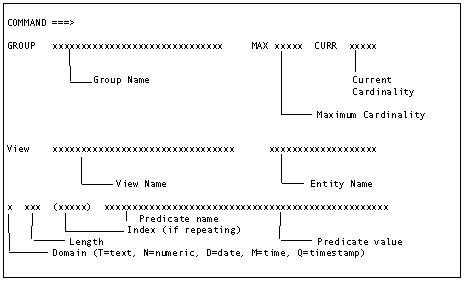
For non-repeating group views, the panel displays a line identifying the group. This is immediately followed by the entity views within the group and the predicates and predicate values for each entity view.
For repeating group views, however, the panel displays a single line that gives the name of the group and its maximum and current cardinality. To see the views within the group, you must expand the repeating group view. You cannot expand a repeating group whose current cardinality is zero. The message Repeating Group is Empty appears at the top right of the panel. You cannot expand a non-repeating group.
To expand a repeating group, type E next to the group and press Enter. The repeating group is expanded to show the entity views defined within the group.
Expanding a nested repeating group view shows the entity views and the name of the next repeating group. Nested repeating group views allow you to expand the repeating group until you reach the inmost nested group. (Continue typing E next to the label GROUP and pressing Enter until you reach the inmost level.)
To expand an entity view within a repeating group, type E next to the entity view and press Enter. The repeating predicates of the entity view are displayed with an index identifying the predicate occurrence number and the predicate value. When you expand a repeating group that has only one entity view, the repeating predicates are immediately displayed.
The current value for each predicate (attribute) is displayed on the panel. You can change any predicate value. To modify a predicate value, type M next to the predicate to be modified, use the Tab key to position the cursor to the predicate value and enter the new value. When you exit the panel, the new value is accepted. Processing continues using the new value.
Modifying a predicate value that exceeds the screen size is a multistep process:
Several commands are available to help you navigate within the panel. These commands are identified in the following table:
|
|
|
ISPF |
|
|
|---|---|---|---|---|
|
HELP |
|
F1 |
|
|
|
UP |
|
F7 |
M, or number of lines |
|
|
DOWN |
|
F8 |
M, or number of lines |
|
|
FIND |
F |
-- |
string ‘r 'str’ng' |
|
|
RFIND |
R |
F5 |
|
RFIND repeats the previously requested FIND command. |
|
RIGHT nnn |
-- |
F11 |
number of characters |
RIGHT is used to view the predicate values that exceed 32 characters. Pressing RIGHT causes the predicate value portion of the panel to scroll to the right. The left side of the panel does not change. If you do not specify the number of characters to scroll, a default value of 10 is used. |
|
LEFT nnn |
-- |
F10 |
number of characters |
LEFT is used to view the predicate values that exceed 32 characters. Pressing LEFT causes the right side of the panel scrolls to the left. The left side does not change. If you do not specify the number of characters to scroll, a default value of 10 is used. |
|
Copyright © 2015 CA Technologies.
All rights reserved.
|
|