

Construction is the stage of CA Gen development where the activities of Planning, Analysis, and Design can be used to build an executable application system. The various application systems that you can construct include:
Note: The ability to generate GUI and client server applications depends on the CA Gen options on your workstation.
You can also cross-generate to available Implementation Toolsets.
The Construction Toolset consists of three tools. They are:
Each tool uses information from certain CA Gen diagrams, to define and create components used in the construction process. The diagrams must be complete and consistent.
The Construction Toolset cannot be installed and run by itself on a workstation. It requires the presence of the Analysis and Design Toolsets. The installation of your application will require a compiler and may require other third party software, like a Database Management System and middleware components. These software components may be on a workstation or on the target system. The location depends on where you intend to run your application. Because the installation uses software other than CA Gen, you may encounter problems that are not related to CA Gen software. You may need to see the vendor documentation for a specific operating system, DBMS, middleware, and compiler.
The following diagram presents an overview of construction:
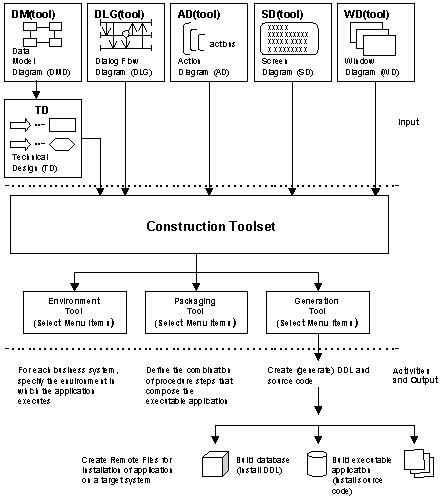
Entity types in the Data Model Diagram (DMD) are implemented as tables in the Technical Design (TD). These tables become physical components of the database. The application program references and manipulates these tables.
Information about the Dialog Flow Diagram (DLG) is incorporated into a transaction controller appropriate to the following application types:
Screen layouts are implemented as screen definitions and controlled by a Screen Manager. Action diagrams contribute to several areas of a generated application.
|
Copyright © 2013 CA.
All rights reserved.
|
|