

As part of the Windows IT installation, there are several delivered DLLs and EXEs that are rebuildable by the customer. These DLLs and EXEs include User Exits, DBMS DLLs, DBMS Loader EXEs, and Dialect DLLs. In order to help identify whether or not one of these files have been rebuilt, CA Gen will now increment a build counter that will be visible on the Version tab of the Properties dialog. This feature is similar to that of Application Versioning, but with limited resource property modifications.
When delivered, the DLLs and EXEs that are rebuildable already have a number of fields populated in the Version tab. These fields remain unchanged when rebuilds occur, in order to properly identify the file that was delivered.
There are a few fields that are now modified when a customer rebuilds one of these files, which aid in identifying a rebuild.
The typical Version tab of the Properties dialog from a delivered rebuildable DLL or EXE looks like the following (using the GUI Runtime User Exit DLL wre850n.dll as an example):
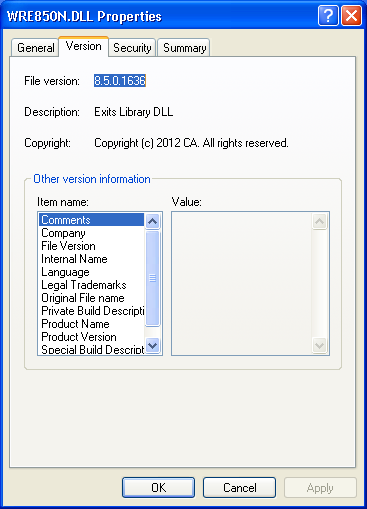
As you can see from the illustration, several of the fields are already populated with CA Gen specific information: File Version, Description and Copyright are viewable at the moment (other fields are not currently focused on and therefore not visible).
While keeping most of these fields ‘as is’ when delivered to continue to identify the DLL or EXE, 2 of the fields can be used to identify that the customer has rebuilt a particular DLL or EXE.
Upon the completion of a rebuild of one of these DLLs or EXEs, the Version tab of the Properties Dialog will now have the following 2 fields modified:
|
Comments: |
Will now contain “Rebuilt by User. Build Number XXX”. |
|
Private Build Description: |
Will now contain timestamp of rebuild |
The field “Comments” contains a 3-digit build number that is incremented each time this particular DLL or EXE is rebuilt.
Note: There are no changes required by the customer to utilize this feature.
Once again using the GUI Runtime User Exit DLL wre850n.dll as an example, the Version tab of the Properties dialog looks like this:
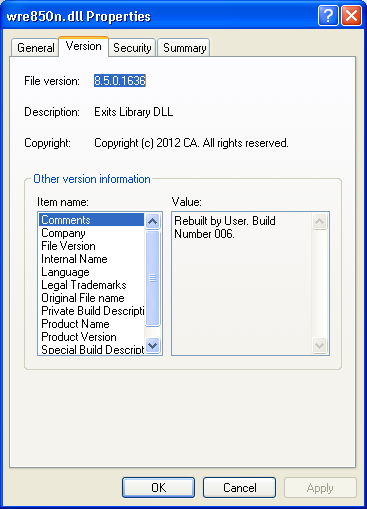
From this illustration above, the only noticable difference is the value in the Comment field, as documented above. The value 'Rebuilt by User. Build Number 006’ indicates that this particular DLL was rebuilt 6 times.
The list of Windows IT DLLs and EXEs that will support the modified fields upon a customer rebuild include:
|
DLL or EXE |
Description |
Rebuild Procedure |
|---|---|---|
|
aecdb2xxn.dll |
Server Db2 Dll |
mkdbs.bat |
|
aecodbxxn.dll |
Server ODBC Dll |
mkdbs.bat |
|
aecoraxxn.dll |
Server Oracle Dll |
mkdbs.bat |
|
aefsecex.exe |
Security Exit |
mksecex.bat |
|
aeuexitxxn.dll |
Server User Exits |
mkexits.bat |
|
{dialect}cxx0n.dll |
All GUI Dialect Global Database Information Container Dlls |
mkdialn.bat |
|
{dialect}guixx0n.dll |
All GUI Message Table Dlls |
mkdialn.bat |
|
stubn.exe |
GUI NoDBMS Stub |
stubn.mak |
|
stubdb2n.exe |
GUI Db2 Stub |
stubdb2n.mak |
|
stubodbn.exe |
GUI ODBC Stub |
stubodbn.mak |
|
stuboran.exe |
GUI Oracle Stub |
stuboran.mak |
|
ti{dbms}ddl.exe |
All DDL loader EXEs |
makeddl.bat |
|
wrexx0n.dll |
GUI Runtime User Exits |
mkexitsn.bat |
|
cmicxxxn.dll |
Client Manager User Exit |
ccmexit.nt |
|
ecicxxxn.dll |
ECI User Exit |
ceciexit.nt |
|
mqscxxxn.dll |
MQ Series Client User Exit |
cmqsexit.nt |
|
csuvnxxn.dll |
CSU Version User Exit |
csuglvn.nt |
|
tcpcxxxn.dll |
TCP User Exit |
ctcpexit.nt |
|
tcpuxxxn.dll |
TCP I/O User Exit |
inetipux.nt |
|
eciuxxxn.dll |
ECI I/O User Exit |
ioeciux.nt |
|
rscuxxxn.dll |
RSC I/O User Exit |
iorscux.nt |
|
prexxxn.dll |
C Proxy User Exit |
proxyxit.nt |
|
mqssxxxn.dll |
MQ Series Server User Exit |
smqsexit.nt |
|
iefdirn.dll |
Directory Services User Exit |
iefdirn.mak |
|
decrexxn.dll |
CM/CB Decrytion User Exit |
makedecr.bat |
|
cidexxn.dll |
Conversion Instance Data User Exit |
makecid.bat |
|
cbmsg{dialect}xxn.dll |
All CB Message Dlls for Dialects |
cbw32\custom.bat |
|
cmmsg{dialect}xxn.dll |
All CM Message Dlls for Dialects |
cmw32\custom.bat |
|
wscxxxn.dll |
Web Services User Exit |
cwsexit.nt |
Note: xx refers to the current release of CA Gen. For the current release number, see the Release Notes.
Note: User Exits are documented in detail in the User Exit Reference Guide.
|
Copyright © 2013 CA.
All rights reserved.
|
|