

When an application is built for the first time, 2 files are copied and/or created as part of the application build. These files are then used repeatedly when rebuilds of the same application occur. Each of these files are explained below:
Application.h contains a number of #defines that refer to fields displayed through the Version tab of the Properties window. The customer can edit the #defines in this file to customize their application's version information.
The first time an application is built, the master version of application.h is copied from the CA Gen installation directory into the model directory. Once this file is copied, it can be modified in order to customize particular version information for all future builds.
The first time an application is built, a new header file is generated to contain a build count and the current timestamp. These values are used to refer to fields also being displayed through the Version tab of the Properties window. Each time the application is rebuilt, the build count is incremented, and the timestamp is updated. This file should only be modified to set the build count to a specific numeric value.
There is one copy of this file for each application being built.
When an application build occurs, applno.bat will read the existing *_buildver.h file, increment the build count, and then rewrite this file with the updated build count and timestamp. The resource file generic.rc, which contains #includes statements for application.h and *_buildver.h, is then compiled and linked into the application. The version information that is contained in these header files are now loaded as resources in the application.
Once an application has been built, you can observer the version information in the Version tab from the Properties dialog.
The following table lists the fields displayed in the Version tab of the Properties window for a customer’s application, with a mapping to the #defines and the header file they are in. There are 2 sections in the Version tab.
The top section contains 3 fields:
|
Displayed Field |
Description of Field |
Mapped #define |
Header stored in |
|---|---|---|---|
|
File Version |
File version of Product, in the format X.X.X.X, appended by the incremented application build number. The starting value is “1.0.0.1” |
PRODUCT_VERSION2, BUILDVERS2 |
application.h and *_buildver.h |
|
Description |
Description of application |
CG_FILEDESCRIPTION |
application.h |
|
Copyright |
Copyright information |
LEGAL_COPYRIGHT |
application.h |
The lower section contains a group box titled “Other Version Information”, and contains the following fields:
|
Field |
Description |
Mapped # defines |
Where found |
|---|---|---|---|
|
Comments |
Can be used for any reason |
COMMENTS |
application.h |
|
Company |
Company Name |
COMPANY_NAME |
application.h |
|
File Version |
File version of file, in the format X.X.X, appended by the incremented application build number. The starting value is "1.0.000001" |
FILE_VERSION, BUILDVERS |
application.h and *_buildver.h |
|
Internal Name |
Internal Project name |
CG_INTERNALNAME |
application.h |
|
Language |
Language of application |
CG_LANGID |
application.h |
|
Legal Trademarks |
Trademark information |
LEGAL_TRADEMARKS |
application.h |
|
Original Filename |
Name of File |
CG_ORIGINALFILENAME |
application.h |
|
Private Build Description |
Timestamp of latest build of application |
BUILDTIME |
*_buildver.h |
|
Product Name |
Name of Product |
PRODUCT_NAME |
application.h |
|
Product Version |
Product version string, in format "X.X.X". The starting value is "1.0.0" |
PRODUCT_VERSION |
application.h |
|
Special Build Description |
Reserved for PTF numbering |
CG_PTFNUMBER |
application.h |
The following example demonstrates the results of using application versioning. The application.h file has been modified as follows:
#include "ptfs.h"
#define COMMENTS "My Comments\0"
#define COMPANY_NAME "My Company\0"
#define FILE_VERSION "3.1.0\0"
#define LEGAL_COPYRIGHT "Copyright Info\0"
#define LEGAL_TRADEMARKS "Trademark Info\0"
#define PRODUCT_NAME "My Product\0"
#define CG_FILEDESCRIPTION PRODUCT_NAME
#define PRODUCT_VERSION "2.1.0\0"
#define PRODUCT_VERSION2 2,1,0
#define CG_INTERNALNAME "Alpha\0"
#define CG_ORIGINALFILENAME "File.Ext\0"
#define CG_PTFNUMBER "\0"
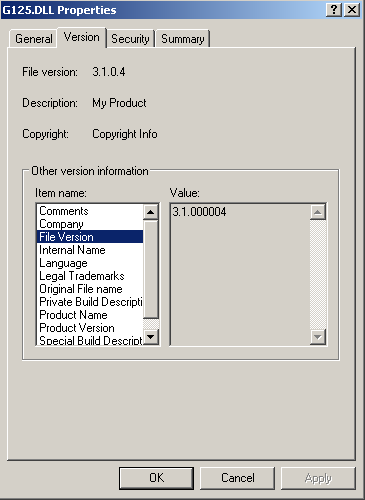
Also in this example we have built the G125 application 4 times. The G125_buildver.h file will reflect the following values:
#define BUILDTIME “Thu 7/29/2010  09:09 AM”
#ifdef BUILDVERS
#undef BUILDVERS
#endif
#ifdef BUILDVERS2
#undev BUILDVERS2
#endif
#define BUILDVERS "00004"
#define BUILDVERS2 00004
The following illustration displaying the Version tab of the Properties dialog for the G125.DLL just built:
|
Copyright © 2013 CA.
All rights reserved.
|
|