

Target system implementation is the process for developing an application on one platform and executing it on another platform. Using this process, you can prepare a single CA Gen model for use on many different platforms. The following illustration describes this concept:
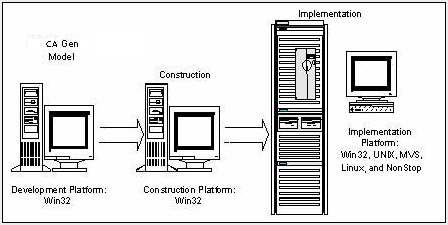
Applications are developed as models using various CA Gen Toolsets on a workstation called the Development Platform. Models are prepared for execution through a process called construction, which may occur on the development platform or on another system. The resulting components, called remote files, are transferred to a target system for compilation and execution. The remote files contain source code, data definition language (DDL), and special control information that allow the model to be installed as an application within a CA Gen environment on the target system.
The various components of the remote files define the organization and contents of the application and make it possible for CA Gen to identify and process the application on the target system. You can test and run the application on the target system within the CA Gen environment. Each application usually includes at least the following three remote files:
To modify an application, update the original model on the development platform, regenerate the changed elements into remote files and move the files to the target system. In this way, you can enhance and modify the implemented systems without having to work directly with the generated code.
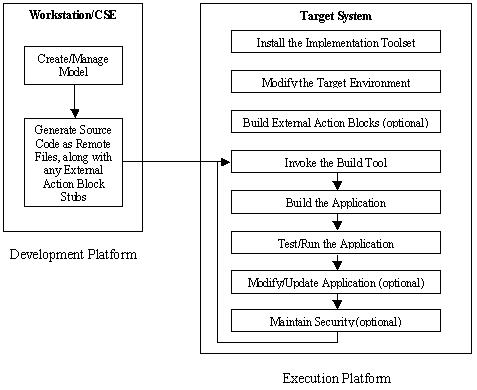
The following illustration shows basic workflow involved when implementing an application on a target system. The workstation tasks are performed first, then the remote files are transferred, and, finally, the target system tasks are completed. The target system tasks primarily involve only the Implementation Toolset and the Setup Tool, which must be installed before the remote files can be processed.
Note: For more information about installing the Implementation Toolset and the Setup Tool, see Distributed Systems Installation Guide.
|
Copyright © 2015 CA Technologies.
All rights reserved.
|
|