

As DB2 z/OS database tables grow, you may find it easier to manage the data in the tables if it were divided into smaller portions. Dividing a table into smaller portions is called partitioning the table. A table partition is not the same as a database partition. A database partition contains data, indexes, configuration files, and transaction logs. A table partition is a data organization scheme in which the table data is divided into one or more storage units. Each partition is stored separately.
The following list contains the types of table partitions:
The PARTITION BY clause of the CREATE TABLE SQL DDL statement defines the table partition.
In CA Gen, you can generate the DDL for a table and then modify the generated DDL to add the PARTITION BY clause in the DDL statement or you can specify the partition details using the CA Gen DB2 z/OS Table Partitioning Plug-in. This plug-in saves time as you need not generate the DDL statements and then manually edit them to include information about the partitions on the table. You can use the plug-in to create a range partition or a size partition on a table.
Using the plug-in lets you maintain the table partition information as part of the CA Gen model. But this information is not displayed to the Toolset user. The partitions within the DB2 z/OS database are only displayed through the CA Gen DB2 z/OS Table Partitioning Plug-in.
Note: Like other Gen dialogs, changes made with this plug-in are not saved in the model until the model is saved in the Toolset.
Note: If you do not have MODIFY or DELETE authority on an entity type (or the attributes of an entity type), you cannot add, delete, or change the partitions associated with the table for that entity type.
Note: The release number of DB2 must be 9 or higher to use the CA Gen DB2 z/OS Table Partitioning Plug-in.
The following diagram illustrates the steps that must be performed for creating a table partition and generating DDL statements for a table.
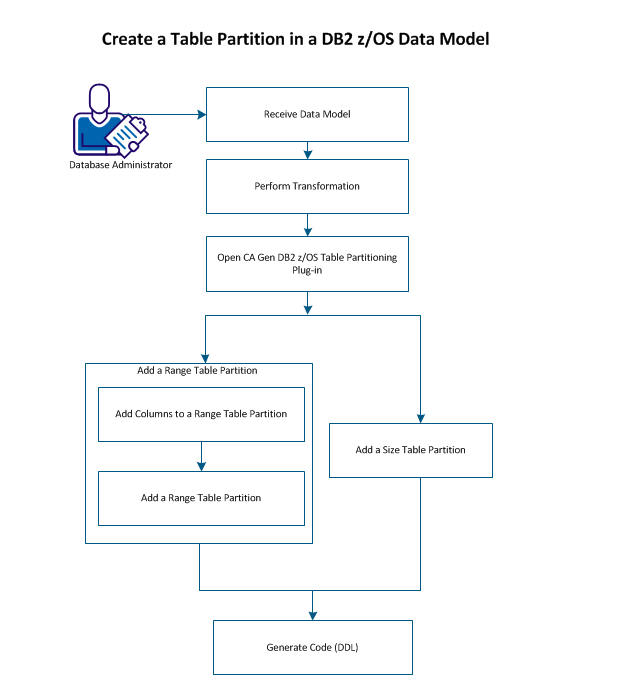
Perform the following steps:
|
Copyright © 2014 CA.
All rights reserved.
|
|