

The following list details the types of CA Gen application servers built and run on NonStop:
The following illustration shows the relationship between various components of a distributed processing environment:
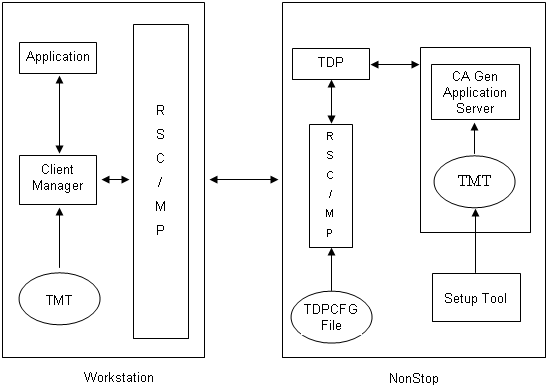
To use a distributed processing execution environment, you must complete the following prerequisites:
For distributed processing on NonStop, ensure that the following components are installed, configured, and started:
Note: For more information about installing, configuring, and starting these products, see the HP Remote Server Call (RSC/MP) Installation and Management Guide.
For the Windows workstation to communicate with the NonStop server, ensure that the following components are installed (may use Client Manager or Communications Bridge), configured, and started:
Note: For more information about installing and configuring RSC/MP over Piccolo, see the HP Remote Server Call (RSC/MP) Installation and Management Guide. For more information about configuring the rsc.ini file and the Client Manager, see the Distributed Processing—Client Manager User Guide. For more information about configuring the rsc.ini file and the Communications Bridge, see the Distributed Processing—Communications Bridge User Guide.
On the NonStop server, a distributed processing user exit (USEREXIT) is provided for encrypting or decrypting transaction data, adding custom data that is not generated by CA Gen to the buffer sent to the client side, customized auditing, and so on.
This user exit is customized, built, and linked into the NonStop application servers that represent the server side of the distributed processing application.
Note: For more information about configuring the server user exit, see the Distributed Processing—Overview Guide.
On the Windows workstation, a distributed processing user exit (IORSC.CXX) is provided for encrypting or decrypting transaction data, adding custom data that is not generated by CA Gen to the buffer sent to the server side, customized auditing, and so on.
This user exit is customized, built, and linked into the workstation application that represents the client side of the distributed processing application.
Note: For more information about configuring and building the workstation user exit, see the Distributed Processing—Overview Guide.
|
Copyright © 2015 CA Technologies.
All rights reserved.
|
|