

For a subset, the report lists the same objects from the root function to the lowest process within the subset.
The first column shows the type of activity: function (F), process (P), elementary process (E), or recursive (R).
The second column shows the hierarchical level of each activity: 1 for the Root Function, 2 for subordinates of the Root Function, 3 for subordinates of level 2 functions or processes. Each successive number-4, 5, 6, and so on.-represents another level, or vertical step down into the hierarchy.
The third column contains the function number that precedes each activity name. The following illustrates function numbers and hierarchical levels.
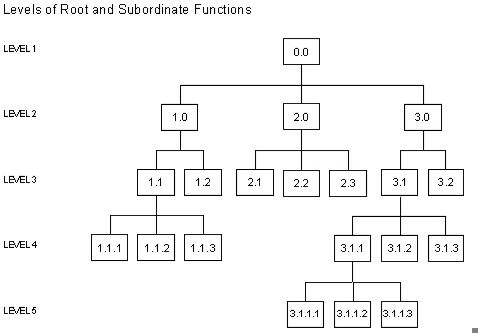
The key to function numbers is as follows:
The fourth column gives the activity name.
The report indicates reusable processes with three asterisks and a message referring to the first occurrence of the process.
In the Function Hierarchy Report the message with Process 2.2.2:
*** SEE ABOVE 2.1.3
refers to Process 2.1.3.
A comparison of the two processes, 2.2.2 and 2.1.3, shows that they are the same: ACCRUE_INTEREST.
If your model or subset contains reused processes, specify the numbering option when generating the report. Numbering enables you to check quickly for their occurrences.
You can generate the Function Hierarchy Report from either the Model Reports menu or the Subset Reports menu using one of the following procedures:
|
Copyright © 2013 CA.
All rights reserved.
|
|