

CA Gen matches the External Action Block export views to the receiving views from the procedure step or action block as in the following illustration. (This is the data that is returned to the procedure step or action block.)The receiving views in the procedure step may be export views or local views.
External Action Block export views match to the receiving views, that are, the export and local views, in the procedure step or action block.
The following figure illustrates the possible supplying and receiving views for view matching in the Procedure Action Diagram. In this figure, Procedure Step ADD_CUSTOMER calls (uses) External Action Block READ_HISTORY.
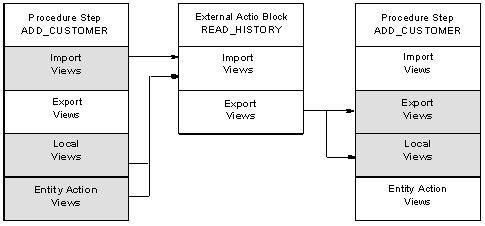
When you have matched the import and export views of the External Action Block, the USE statement is complete. The procedure that is used to match the views is described in the Block Mode Design Guide. The USE statement displays in the action diagram of the procedure step or action block.
Note: For more information, see the Block Mode Design Guide.
The following code sample shows a portion of the action diagram for the procedure step ADD_CUSTOMER:
Procedure Step:  ADD_CUSTOMER
 ADD_CUSTOMER
  IMPORTS:
      Group View input customer_details
          Entity View input customer
  EXPORTS:
      Group View new customer_details
          Entity View existing customer
  LOCALS:
       Work View ief_supplied
  ENTITY ACTIONS:
       Entity View current cost_center
              .
              .
              .
  USE read_history WHICH IMPORTS: Entity View input customer
                   WHICH EXPORTS: Entity View existing customer
This procedure step uses the External Action Block READ_HISTORY.
|
Copyright © 2015 CA Technologies.
All rights reserved.
|
|