

The Action Diagram View Display lets you see the current import, export, local, or entity action views for an action diagram. The display shows the detailed information about the view and its predicates (attributes), including the current predicate values. The display also includes commands to expand repeating group views and modify predicate values.
Access the display from the Action Diagram Trace panel, using the command:
where vvvv = IMPORT, EXPORT, LOCAL, or ENTITY.
The following illustration shows a sample EXPORT view display.
----------------------- APPLICATION DEVELOPMENT ---------------------------
                     MENU Action Diagram EXPORT View Display

 COMMAND===>                                                   SCROLL===> HALF
 S                                             1...+....10...+....20...+....30..
   VIEW  TEMPOUT SELECTION
   N 001  NUMBER                           =   +0
   VIEW  SENT EMPLOYEE
   N 006  NUMBER                           =   +000000
   VIEW  SENT DEPARTMENT
   N 004  NUMBER                           =   +0000
   VIEW  SENT DIVISION
   N 003  NUMBER                           =   +000
   ******  BOTTOM OF VIEW  *********


 Sel codes:  E:Expand Repeating Group Views   M:Modify data value
For entity views that are not a part of a group, the Action Diagram View Display Panel displays the name of the view followed by its predicates and predicate values. The format of the display information is shown in the following illustration:
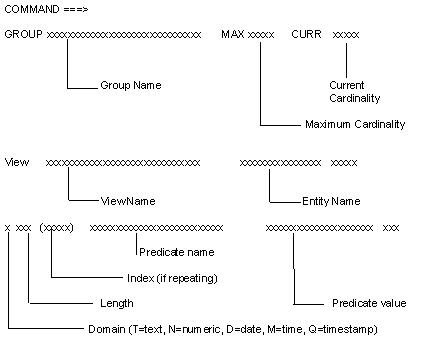
For non-repeating group views, the panel displays a line identifying the group, immediately followed by the entity views within the group and the predicates and predicate values for each entity view.
For repeating group views, the panel displays a single line with the name of the group and its maximum and current cardinality. To see the views within the group, expand the repeating group view. You cannot expand a repeating group whose current cardinality is zero. The following message displays at the top right of the panel:
Repeating Group is Empty
You cannot expand a non-repeating group.
To expand a repeating group, type E next to the group and press Enter. The repeating group expands to show the entity views defined within the group.
Expanding a nested repeating group view shows the entity views and the name of the next repeating group. Nested repeating group views let you expand the repeating group until you reach the inner-most nested group. Keep typing E next to the label GROUP and pressing Enter until you reach the inner-most level.
To expand an entity view within a repeating group, type E next to the entity view and press Enter. The repeating predicates of the entity view are displayed with an index identifying the predicate occurrence number and the predicate value. When you expand a repeating group that has only one entity view, the repeating predicates are immediately displayed.
The current value for each predicate (attribute) is displayed on the panel. You can change predicate values. To modify a predicate value, type M next to the predicate to be modified, use the Tab key to position the cursor to the predicate value and enter the new value. When you exit the panel, the new value is accepted. Processing continues using the new value.
Modifying a predicate value that exceeds the screen size is a multi-step process:
Several commands help navigate in the panel.
Displays the online help.
Moves the cursor up number of lines
Accepts a parameter of M or number of lines
Moves the cursor down a number of lines
Accepts a parameter of M or number of lines
Locates a string.
Accepts a string or a string that is enclosed in single quotes, as in 'string'
Repeats the previously requested FIND command.
Scrolls the predicate value portion of the panel to the right. Use RIGHT to view the predicate values that exceed 32 characters.
Accepts a number to indicate the number of characters to scroll.
Default: 10 characters
Scrolls the predicate value portion of the panel to the left. Use LEFT to view the predicate values that exceed 32 characters.
Accepts a number to indicate the number of characters to scroll.
Default: 10 characters
|
Copyright © 2015 CA Technologies.
All rights reserved.
|
|