

The procedures to generate code for a remote installation are the same as the procedures for a local installation. Setting the Remote Installation option to Yes in the Generation Options panel causes CA Gen install process to prepare the generated code for transfer to a remote environment. CA Gen stores the generated code in a set of remote files.
Transfer the IPs to the target platform after generation. Use the Implementation Toolset on the target platform to install the remote files.
Note: For more information, see the z/OS Implementation Toolset User Guide.
The following illustrations show the basic flow of the generation process. Each step in generating the applications system, that is database generation, referential integrity generation, and system generation, produces files for a remote installation.
The following illustration shows the flow of remote system generation with libraries.
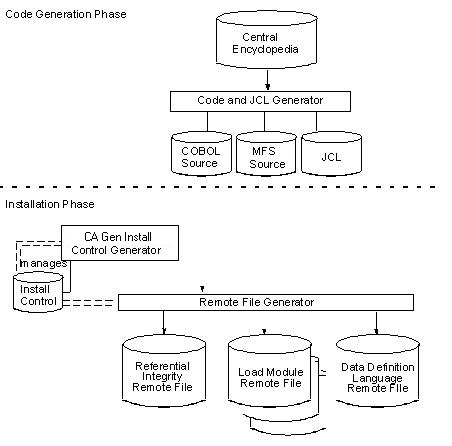
The database DDL remote file is named prefix.IEF.dbname.REMINST. One DDL remote file exists for all load modules in the application.
Load module remote files are named prefix.IEF.loadname.REMINST. One load module remote file exists for every load module in the application. Be sure to transfer them all.
The RI trigger remote file is named prefix.IEF.CASCADE.REMINST. Referential integrity is implemented with the use of RI trigger modules. Each CA Gen application has only one RI trigger remote file, regardless of the number of load modules in the application.
The Implementation Toolset on the target environment splits the remote file, generating a command procedure from the control information and populating libraries/directories with the other components of the remote file. The command procedure is used to compile, link, and install the load modules.
The remote installation involves these major activities:
|
Copyright © 2015 CA Technologies.
All rights reserved.
|
|