

Analyzing trends in encyclopedia activity can be useful to monitor encyclopedia performance. The FOCUS report illustrations list the information required to produce a FOCUS report. The report lists trends in activity over an 8-week period. The illustration titles explain the purpose of the information. As you create the information, replace encycreator with the ID of your encyclopedia database creator.
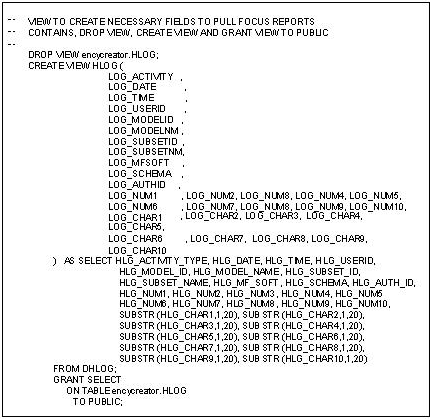
View of Encyclopedia DHLOG for FOCUS reporting:
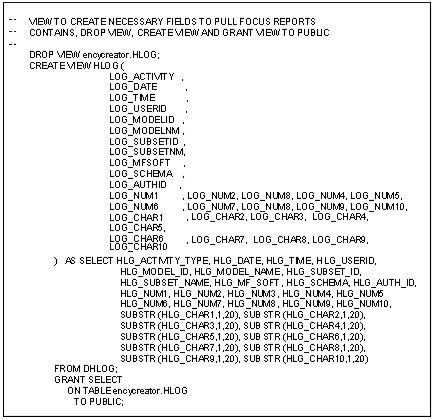
FOCUS master file description:
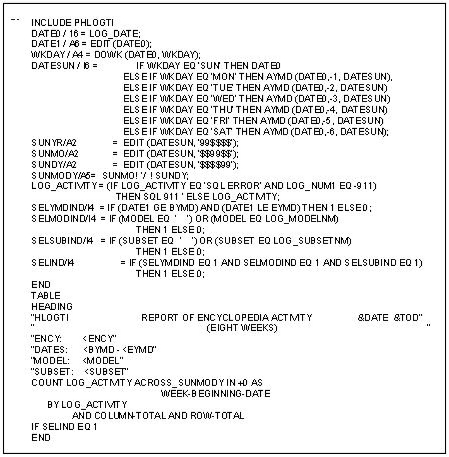
FOCEXEC to create eight-week trend report:
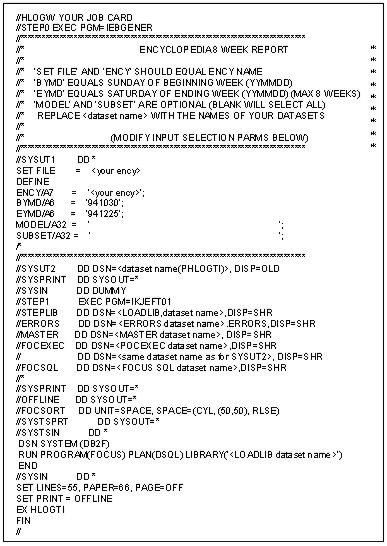
JCL to execute the FOCEXEC:
Sample output of FOCEXEC:
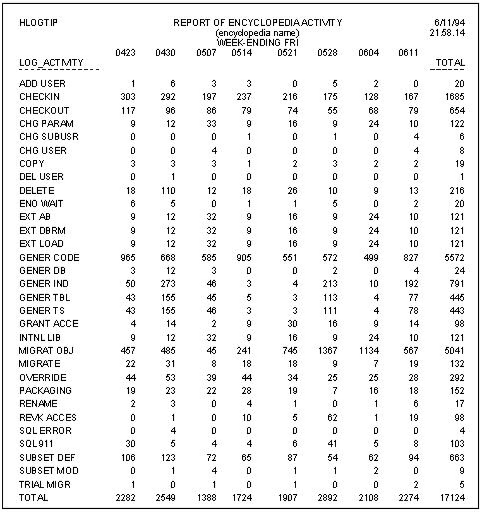
The trend report is useful to see if your users are following your project guidelines (such as the recommendations discussed in the Process Recommendations chapter). For example, if the report shows that the number of uploads and downloads are equal, you know that users are not frequently uploading without check in. You can obtain other valuable information from the report also. For example, you can determine a trend of encyclopedia contention as a percent of total activity. You determine this by adding the values for SQL 911 and ENQ WAIT.
|
Copyright © 2013 CA.
All rights reserved.
|
|