

For each Web Service Definition, you generate a WSDL document that describes in detail Web Services and their custom operations. In addition, a set of XSL files is also created. These files contain transformation rules to be used at runtime. These rules dictate the customization that EJB bound SOAP messages must follow when sent between the application server and clients. After you create and customize your Web Service Definitions, you can generate customized interfaces.
To generate the WSDL file and the corresponding XSL files for a Web Service Definition, right-click the Web Service Definition in the Web Services view and click Generate Custom Interface. Alternatively, you can click Generate and Install Custom Interface. This option invokes the Build Tool immediately after generation is complete. The Build Tool proceeds to build the newly created module.
After generation, the WSDL documents are stored in the following folder:
\\<model directory>\java\Web Services\wsdls
The XSL files are stored in the following folder:
\\<model directory>\java\Web Services\transformations
In addition, CA Gen Studio generates an ICM file to be used by the Build Tool. This file is similar to the ICM files generated by the Toolset. It contains necessary information that the Build Tool uses to build and package resources that are needed by the web application at runtime.
After this file is generated, it will be located in the folder \\<model directory>\java. This file is named as <WSD-name>.WSD.icm, where <WSD-name> is the given name of the web service definition for which the generation is being done.
In either case, the new module must be built and assembled with the rest of the application using the Build Tool.
In the Build Tool, you select at least one module of type SRVR with the WSD module (which in the Build Tool shows as being of type SRVR_ROUTER). You cannot create an EAR file out of a WSD war file alone. The SRVR module is generated when you select EJB Web Services as TP monitor in the Generation Defaults dialog. At the end of the assembly your EAR file contains the following information:
Make sure that you include the correct WSD files with the appropriate EJB jar files.
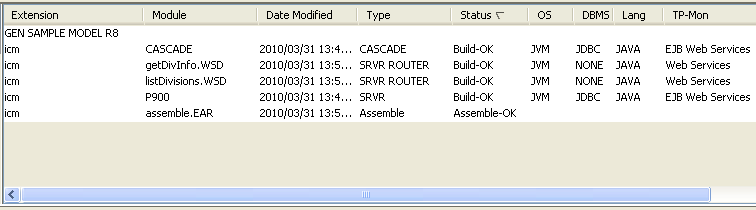
The following illustration from the Build Tool shows the build status after the application is assembled using the SAMPLE model that is provided with CA Gen. Two Web Service Definition modules, defining custom web services, have been assembled into an EAR file with a server module. The CASCADE module is included too because the application accesses a database.
Note: When publishing or exposing your customized Web Services that it is necessary to use the generated WSDL residing in the Web Service Definition module (war file) within the assembled ear file instead of the generated WSDL found in the \\<model directory>\java\Web Services\wsdls directory. This is due to WSDL post processing activity during assembly time. Selection of the target application server determines the difference between the two WSDL documents. Use third-party tools to extract the WSDL.
Note: For more information about the different tasks that are required to assemble CA Gen applications, see the Build Tool User Guide.
|
Copyright © 2015 CA Technologies.
All rights reserved.
|
|