

Creating Custom Proxies and Web Services › How to Create Custom Proxies › Add a Proxy Definition
Add a Proxy Definition
A proxy definition is a collection of proxies. To exist, a proxy definition must be associated with a business system.
Follow these steps:
- Open a model in the Custom Proxies view.
- Expand the Proxy Definitions folder in the Custom Proxies view to display all the proxy definitions.
- Right-click the Proxy Definitions folder and click Add Proxy Definition.
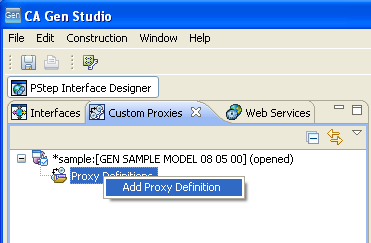
The Add Proxy Definition dialog opens.
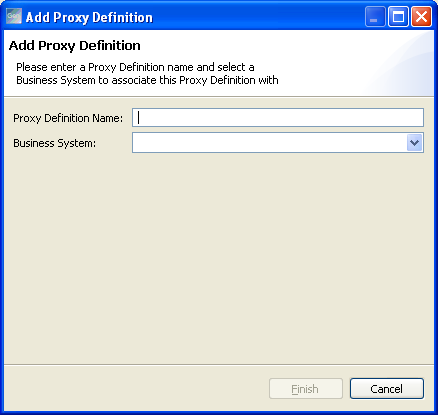
- (Optional) Type a name for the proxy definition in the Proxy Definition Name field.
Note:
- The proxy definition name may include alphanumeric characters and special characters.
- A space is converted to an underscore character.
- You cannot create duplicate proxy definitions.
- Select the business system to which you need to add the proxy definition from the drop down menu and click Finish.
The proxy definition is added to the model tree in the Custom Proxies view.
Note: Although proxy definition names are not limited to a certain length, their names must be unique within the first 32 characters. This is due to legacy rules governing names of certain metamodel objects. Note that in the Proxy Code Generation dialog in CA Gen Toolset only the first 32 characters of the web service definition are displayed.
Copyright © 2015 CA Technologies.
All rights reserved.
|
|