

Specifying Properties for WebSphere MQ Applications › Set Business System Defaults › Specify the Properties for Individual Server Managers
Specify the Properties for Individual Server Managers
You can use the Server Environment Parameters dialog to specify the properties for individual server managers.
Follow these steps:
- Highlight a specific server manager in the Cooperative Packaging tool.
- Select or right-click Detail, Server Environment to open the Server Environment Parameters dialog box.
- Select the target Operating System, DBMS, and Language.
- Set the TP Monitor field. he valid TP Monitor entries based on the operating system you select are as follows:
- Z/OS
-
CICS
IMS
- UNIX
-
IEFAE
- Windows
-
IEFAE
- In the Communications field, select MQSeries.
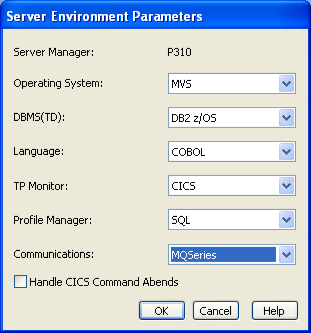
Note: The Server Manager entry in the above screenshot shows the name of the specific server manager. Compare this with the name *ALL* appearing in the figure Server Environment Parameters Dialog Box for Business System. There, the *ALL* represents all server managers, and individual server managers do not have to be individually detailed.
Copyright © 2013 CA.
All rights reserved.
|
|