

After generating your COM Proxy, a \proxy\com directory exists within your <model-name>.ief directory. All proxy code is contained in subdirectories beneath your <model-name>.ief \proxy\com directory.
The following file map shows the structure of the generated directories:
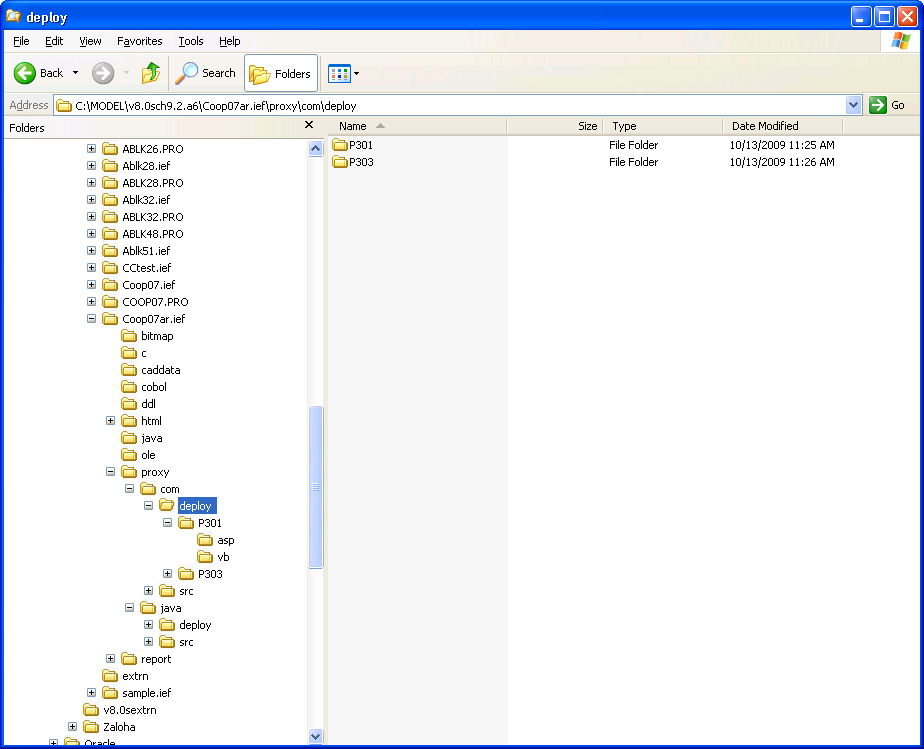
After the Build Tool has successfully built the proxy, the \proxy\com directory includes a \deploy directory, which includes \asp and \vb directories. If the XML interface was selected for proxy generation, the \deploy directory also contains a \xml directory. The \asp, \vb and \xml directories contain generated sample Active Server Page code, a sample Visual Basic template, and a sample XML application, respectively. The Active Server Page and Visual Basic files are not part of the proxy itself, but are provided as samples and quick tests. The XML directory contains an XSD file. The XSD file is part of the proxy, but the sample XML file and test application are not part of the proxy. If you want to use these files, you can modify them as per your requirements.
|
Copyright © 2015 CA Technologies.
All rights reserved.
|
|