

Setting the Server Manager EJB/RMI properties is required only when the application is going to be deployed in more than one EAR file. Some examples of this situation include:
If the application is being deployed in exactly one EAR file, these properties need not be set.
The Server Manager properties dialog allows you to specify EJB/RMI‑specific information. Supplying this information simplifies the deployment. However, the values that are entered in the fields tend to be application-server dependent. Therefore, the EAR file created by CA Gen will contain application server‑specific information.
To open the Server Manager properties dialog, open either the Cooperative Packaging or the Cooperative Generation dialog. Then either double-click the desired Server Manager, or select the Server Manager and select Properties from the Detail menu. The Server Manager properties dialog appears.
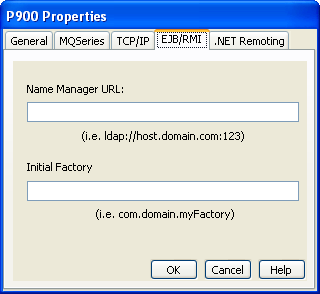
The values entered in the properties dialog are application-server dependent. Review the documentation for your application server to determine the values for the following fields:
localhost:1099
where localhost can be in IPv4 or IPv6 format.
org.jnp.interfaces.NamingContextFactory
|
Copyright © 2013 CA.
All rights reserved.
|
|