

For NonStop RSC/MP server connections, you must set server configuration parameters within the Client Manager corresponding to the NonStop target server environment.
Note: Asynchronous flows, to a NonStop server are not supported through the Client Manager.
You can select the RSC/MP target server transport type for connecting to the NonStop host platforms.
Follow these steps:
The Server Configuration dialog is displayed.
The Client Manager automatically supplies the API DLL name.
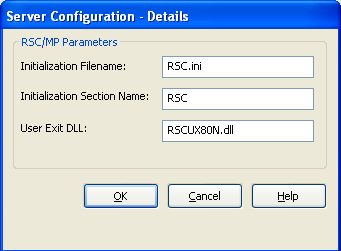
Identifies the name and location of RSC/MP communications product's initialization file. This file is located in the RSC/MP install bin directory. If this directory has been added to the PATH environment variable a full path name is not required. For example, RSC.ini.
Identifies the section name within the RSC.INI file that contains the target server configuration information. For example, GEN_RSC.
Identifies the Client Manager's RSC/MP user exit DLL name. If a name is not specified, then the User Exit will not be called.
Note: Check your NonStop RSC/MP Transport API documentation for case-sensitivity requirements for parameter fields.
The Client Manager is now configured for NonStop RSC/MP.
|
Copyright © 2013 CA.
All rights reserved.
|
|