

Configuring Client Manager Server Connections › Server Configuration
Server Configuration
Each server definition is added to the active Client Manager configuration using the following Server Configuration dialog:
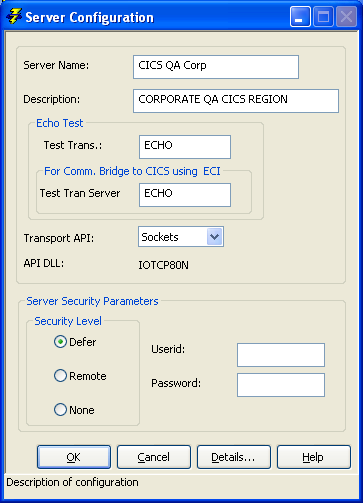
The fields in the Server Configuration dialog are explained in the following list:
- Server Name—A unique label used within the Client Manager to identify a target server.
- Description—An optional text field that provides an additional description of the associated target server.
- Echo Test—Provides the transaction program name (or transaction code) that will be used by the Client Manager when it is directed to send a test transaction to the associated target server.
In addition to the transaction code, the Client Manager must also provide the program, or load module, name of the test server application for use when the transaction targets a Comm. Bridge that services a CICS region using ECI as its transport mechanism. The Client Manager must place the load module name corresponding to the test transaction into the CFB header for the Communications Bridge to process flows using ECI.
- Transport API—The transport API designates which communications protocol is used to communicate with the associated target server execution environment. The Client Manager supports the following transport/protocols:
- LU6.2 (CPI-C)
- TCP/IP (Sockets)
- UNIX: CA Gen Transaction Enabler (User Funnel)
- UNIX: CA Gen Tuxedo Proxy Client
- Windows: CA Gen Transaction Enabler (User Funnel)
- Windows: CA Gen Communications Bridge
- Windows CA Gen Enterprise Java Bean Common Format Buffer Converter Services
- z/OS CICS Socket Listener
- z/OS CICS: TCP/IP Direct Connect
- z/OS IMS: IMS TCP/IP Direct Connect
- RSC/MP (Remote Server Call)
- Server Security Parameters—Each configured server has a set of security parameters associated with it. These security parameters include a Security Level, UserID, and Password.
The three security levels, None, Remote, and Defer, inform the Client Manager about whether it should attempt to supply security data when attempting to process a cooperative flow request to the target server.
The user id and password are the security credentials that are used by the distributed processing server processes to grant execution access.
More information:
Testing the Client Manager
Server Access Security Using User ID and Password
Copyright © 2013 CA.
All rights reserved.
|
|