

Running a Debug Session › Use Breakpoints to Control Program Execution › Set Hit Counts and Conditional Breakpoints › Set a Condition on a Line Breakpoint
Set a Condition on a Line Breakpoint
You can set a condition on a breakpoint so that the breakpoint suspends program execution only when the condition is satisfied.
Follow these steps:
- Do one of the following steps:
- In the Breakpoints view, right-click the breakpoint on which you want to set a condition, and select Properties.
- In the vertical ruler of the PAD Code View editor, right-click the breakpoint on which you want to set a condition, and select Breakpoint Properties from the pop-up menu.
The Breakpoint Properties dialog appears.
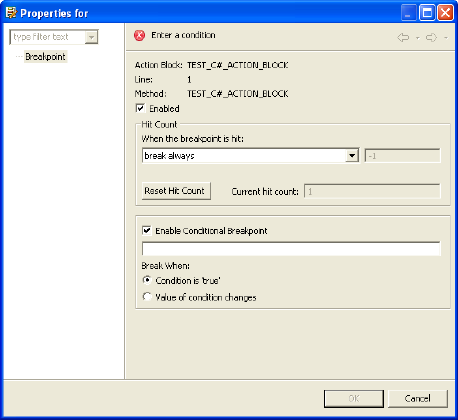
- Select Enable Conditional Breakpoint.
The text field for Enable Conditional Breakpoint is enabled.
- Enter a boolean expression in the Enable Conditional Breakpoint field.
- Click one of the following Break When option buttons:
- Condition is true
-
The breakpoint suspends program execution before the line of code containing the breakpoint is executed each time the condition evaluates to true.
- Value of condition changes
-
The breakpoint suspends program execution only when the result of the condition changes.
- Click OK.
The Diagram Trace Utility saves the changes and closes the dialog.
More information:
Expressions
Copyright © 2013 CA.
All rights reserved.
|
|