

Numeric editing is somewhat difficult because of the different edit pattern formats and the many different possibilities. Basically, input numeric editing attempts to match the edit pattern to the input presentation based on the order of digits and literals for each picture string in the edit pattern.
Pattern matching is based on the edit pattern picture string as the rules for interpretation. For example, an edit pattern of ZZZ,ZZ9.99 represents the following rule: 0 -3 optional digits, followed by an optional comma, followed by 0-2 optional digits, followed by a mandatory digit, period, and finally 2 digits. This is illustrated in the following syntax diagram for pattern matching of numeric edit patterns.
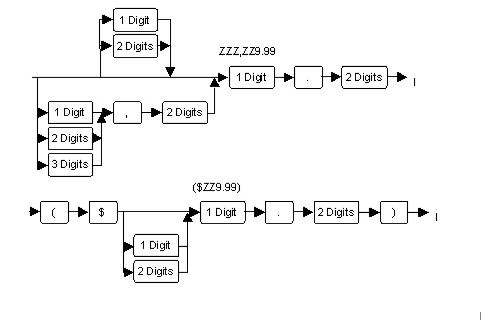
In the syntax diagram, the rules for interpretation of any edit pattern are somewhat vague. The diagram shows the translation of an edit pattern into a syntax diagram, but yields little information on how that transformation is performed.
The following list details the interpretation rules:
Pattern matching begins with the positive picture string. It continues with the negative picture string for edit pattern formats 2 and 3. When the positive and negative strings fail, the zero picture string is matched if the edit pattern is format 3. The sign or magnitude of the variable is known based on which pattern matches.
For example, if the positive string matches the input pattern, then the sign is set to positive. If the negative string matches, then the sign is set to negative. If the zero picture matches, then the magnitude of the value is set to zero and editing ends for this variable. Note that even if the positive or negative string matches the general pattern of digits and literals input, no value has yet been extracted.
When a positive or negative pattern is matched, then the value is extracted and converted to the domain of the variable. Editing then ceases for this field.
If no pattern is matched, then the input edit routines revert to standard algebraic notation rules for interpretation of the value. When the value is valid, both the sign and magnitude are extracted and set into the variable after domain conversion.
If the algebraic notation rules do not yield a result, the appropriate characters in the input are flagged in error and the field is set to an error state. Input editing of that field ceases.
|
Copyright © 2013 CA.
All rights reserved.
|
|