

It is useful to send data between procedure steps in a dialog flow, especially when the same information is needed in both steps. Communicating data between steps can improve system flow and reduce the chance for error. During a transfer or a link, view matching is the way you specify the export data views of the source procedure step that should be placed in the import data views of the destination procedure step before the latter executes.
Flows to procedure steps in external business systems require view matching as well as flows between procedure steps within a business system. When matching views, you select the receiving views for the destination procedure step and the supplying views for the source procedure step. CA Gen guides you through the view matching by providing possible views to match and determining whether the match is possible.
In a transfer, control passes from the source step to the destination step. Match the export views of the source procedure to the import views of the destination procedure.
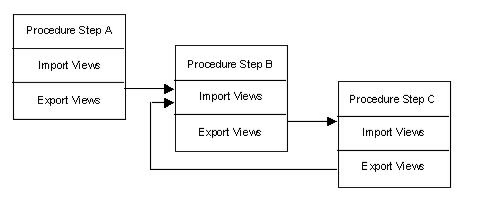
For example, in the next illustration, Procedure Step A transfers to Procedure Step B, and the export views of Procedure Step A are matched to the import views of Procedure Step B.
In a link, control passes from the source to the destination and, depending on the logic, may or may not return to the source. After matching the export views of the source to the import views of the destination, you match the export views of the destination to the import views of the source.
In the same illustration, Procedure Step B links to Procedure Step C and matches export to import in both directions.
Note: In a client/server application, minimize the volume of data transferred from the server to the client. When matching server export views to client import views, specify only the data that is required to complete a unit of work.
The following illustration shows an example of view matching export to import views.
|
Copyright © 2013 CA.
All rights reserved.
|
|