

When you add a procedure to the DLG, CA Gen software adds it as a single-step procedure. When a procedure contains more than one step, the DLG distinguishes the procedure from the procedure steps.
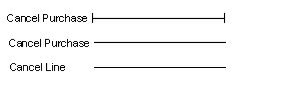
The procedure is represented by a horizontal line with a vertical line at each end. Each procedure step is represented by a horizontal line without a vertical line at the end. The procedure steps appear immediately below the procedure. CA Gen software assigns the procedure name to the first procedure step. If desired, you can change the name of the first procedure step using the Detail or Step Properties actions. You assign a unique name to the second step and all other steps that you add to the procedure.
The following illustration shows a procedure and procedure step names. The Cancel Purchase procedure contains two procedure steps: Cancel Purchase and Cancel Line.
The following example shows a procedure with two procedure steps:
Procedure steps assume the type of implementation (online or batch) of the parent procedure.
|
Copyright © 2013 CA.
All rights reserved.
|
|