

The following illustration shows what occurs as control flows from a client procedure to a server procedure and back.
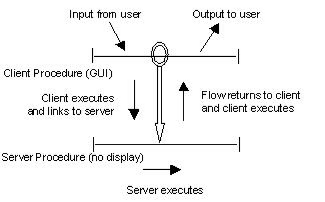
After a distributed process has been split into client and server procedures, you need to add flows between the procedures. Flows to a server are defined to connect client procedures to the information processes, which are implemented as server procedures. The flows must always return and are defined as links. Maintenance of both client and server logic will be simpler if few dialog links between a client and server are defined. For instance, add, change, and delete requests should ideally be on one flow, not three.
One starting place is to first add dialog flows between the client procedures that implement user tasks. The server links are in addition to the client dialog flows. The users should not be able to tell when the client is accessing the server, so you can think of these additional flows as being invisible to the user.
Link flows must be used to join client and server procedures; transfer flows cannot be used. The link flow works in the following manner:
|
Copyright © 2013 CA.
All rights reserved.
|
|