

Consider the scenario where CLIENT in the source model has the same name as CLIENT in the destination model, but CLIENT in the source model shares common ancestry with CUSTOMER in the destination model. The two objects named CLIENT cannot be logically the same. You can be sure such objects are not meant to be equivalent.
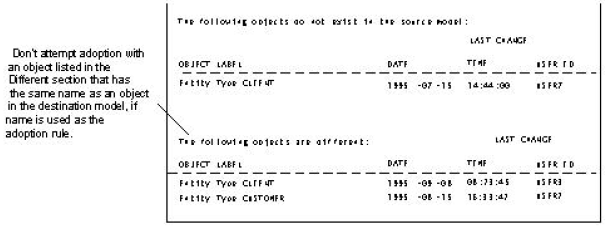
Since no object in the source model has an Original Encyclopedia ID and Original Object ID that matches CLIENTs in the destination model, the Compare process reports that CLIENT does not exist in the source model, even though there is an unrelated entity type called CLIENT in the source model.
Since CLIENT in the source model has an Original Encyclopedia ID and Original Object ID that matches CUSTOMER's in the destination model, the Compare process evaluates CUSTOMER and CLIENT as equivalent and reports that they are different based on different timestamps.
The following figure shows what would happen if adoption were requested. CLIENT in the destination model would not be adopted because another object in the destination model, CUSTOMER, already owns the Original Encyclopedia ID and Original Object ID that adoption would apply. That is, you could not replace the Original Encyclopedia ID and Original Object ID of CLIENT in the destination model with 99-11, because these values already identify CUSTOMER in the model, and no more than one occurrence of the combination is permitted in a model.
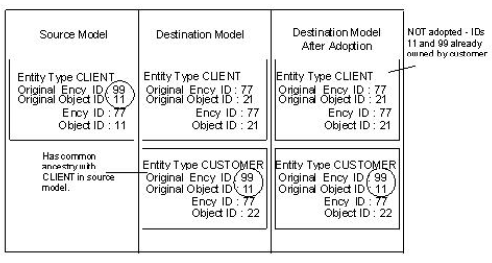
The general rule is to avoid performing adoption between two objects with matching names when one of them shares common ancestry with another object with a different name. This guideline expressed in terms of the Compare Report would be—Never attempt adoption of an object listed in the Different section of the Compare Aggregate Object Report.
To do so in a case like this would result in an IGNORED action since you cannot replace the IDs of an object with IDs that already exist in the model. See the message IGNORED in the table, Adoption Report Information Messages in Adoption Report Messages.
|
Copyright © 2013 CA.
All rights reserved.
|
|